Customer SupportNew
Bilingual Arabic and English support agent for WhatsApp
Detect Arabic or English (including Arabizi), answer in the customer's language from your knowledge base, and hand over to your team when needed.
 KnOp
Answer customer questions on WhatsApp 24/7 from your own FAQs and policies, and alert your team when a person needs to step in.
Included in Pro and aboveStarter workspaces can read this template but not deploy it.
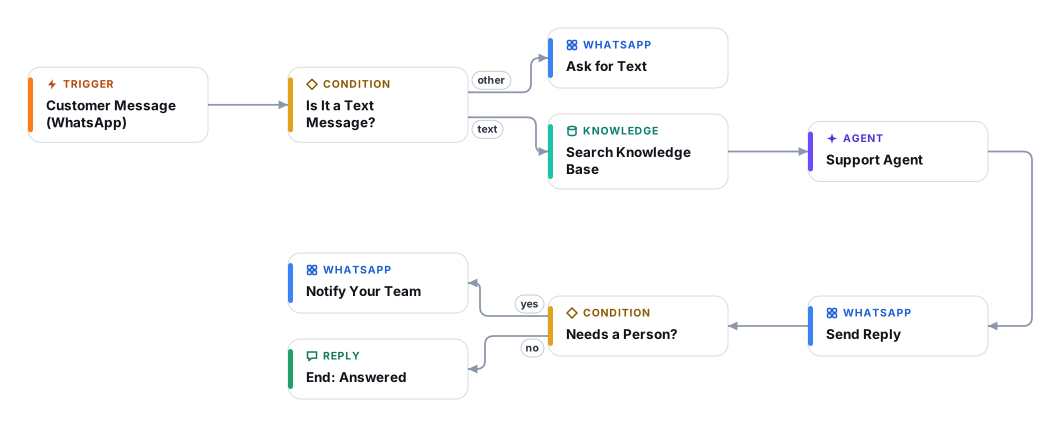
This template turns your WhatsApp Business number into a first-line support desk. Every text message a customer sends is matched against your knowledge base (the FAQs, policies, price lists and product guides you upload to a Document Store), and an AI agent writes a short, friendly reply that sticks to what those documents say.
It is built to know its limits. If the knowledge base has no answer, if the customer is upset, asks for a person, or raises a refund, payment or legal topic, the agent says a teammate will follow up and your team receives a WhatsApp alert with the customer, the topic and the reason. The agent never invents order details, never asks for card numbers or codes, and ignores instructions hidden inside customer messages.
It suits shops, clinics, restaurants, salons, schools and service businesses that already take questions on WhatsApp. Plan about 45 minutes for setup if your WhatsApp Business Cloud API access is ready (most of that time is Meta account work, not Cadrix), plus the time to prepare your documents.
Good to know: replies go out automatically, so review the first conversations in Executions before you promote the number. After a handover the agent can still answer follow-up messages from the same customer; switch the workflow off for a busy period if your team prefers to take over completely.
The WhatsApp trigger starts a run for each incoming message. Images, voice notes and stickers get a polite request to type the question instead.
The message is matched against the Document Store you choose, so the agent only sees passages that are relevant to this question.
It writes a short WhatsApp reply in the customer's language, using only the passages. If they do not cover the question, it says so honestly instead of guessing.
The customer always gets an answer first. The agent remembers the last ten messages of that customer, so follow-up questions make sense.
For complaints, requests for a person, refunds, payments, legal topics or unanswered questions, your team receives a WhatsApp alert with the topic and the reason, and replies to the customer directly.
Anyone can read this page. Deploying the template into your workspace needs a Pro, Team or Enterprise plan. Starter workspaces can browse the library but cannot deploy templates. See plans.
You will connect OpenRouter API key, WhatsApp App (Meta App ID and Secret), WhatsApp API (access token and phone number ID) and fill in a few settings. Setup takes about 45 minutes. Your credentials stay in your own workspace.
Yes. Using the template creates a normal workflow in your workspace on the visual canvas. Rename it, edit any step, add approvals, test it and run it like any other workflow. It counts toward your plan’s workflow limit.
Yes. This workflow can send or write to external systems. Review the steps and test it with sample data before you activate it, and consider adding an approval step.
More workflows teams use alongside this one.
Detect Arabic or English (including Arabizi), answer in the customer's language from your knowledge base, and hand over to your team when needed.
KnOpAnswer "where is my order?" on WhatsApp by looking the order up in your store API, sharing details only with the verified phone number.
HTOpLabel every support email, draft a reply from your knowledge base, and send it only after an approver clicks Approve in their inbox.
 KnOp
Every template is open to read. Deploying one into your workspace needs a Pro, Team or Enterprise plan; Starter workspaces can browse the whole library.