Customer SupportNew
WhatsApp AI support agent with your knowledge base
Answer customer questions on WhatsApp 24/7 from your own FAQs and policies, and alert your team when a person needs to step in.
 KnOp
Detect Arabic or English (including Arabizi), answer in the customer's language from your knowledge base, and hand over to your team when needed.
Included in Pro and aboveStarter workspaces can read this template but not deploy it.
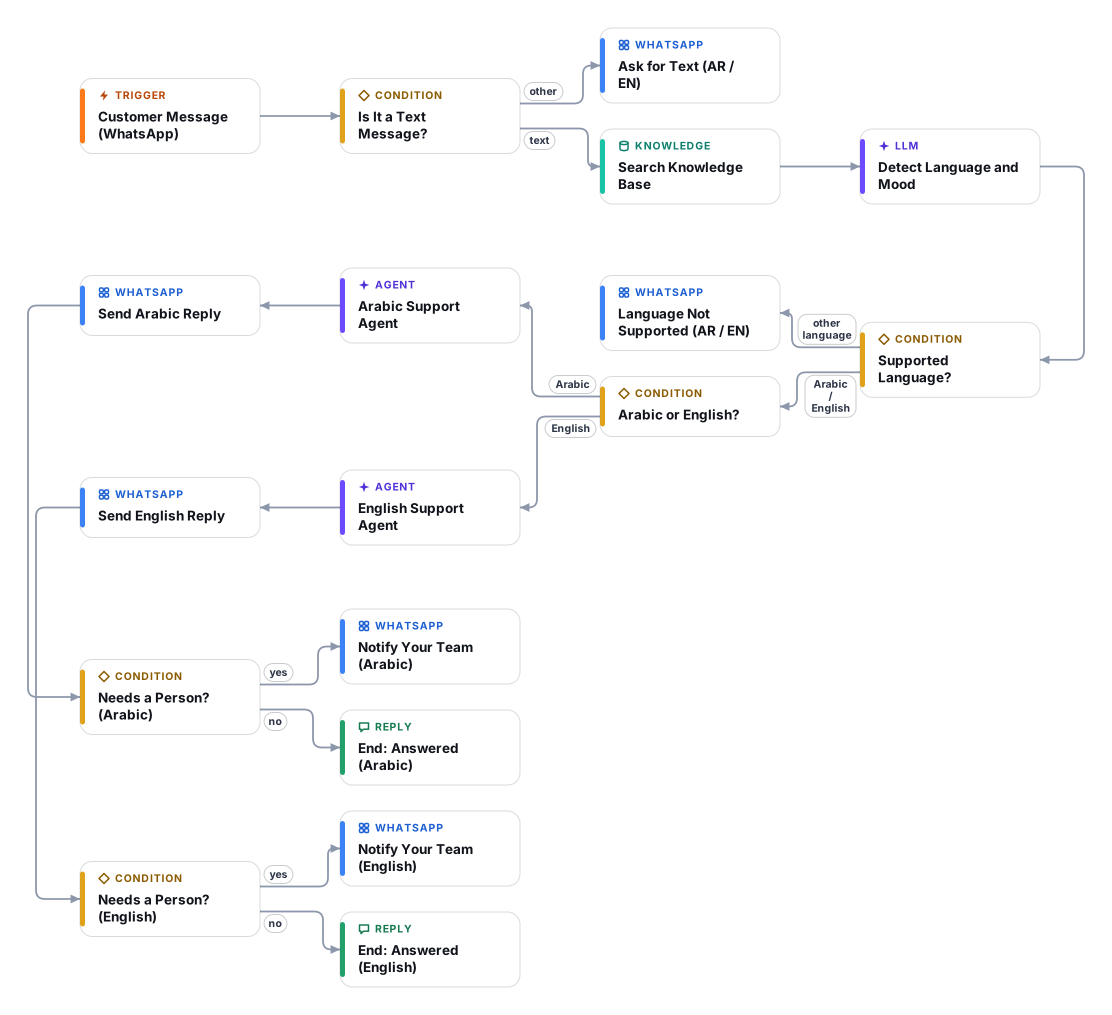
Customers in the Gulf write to you in Arabic, English, or a mix of both, and a single-language bot answers half of them badly. This template detects the language of every WhatsApp message first (Arabic in any dialect, Arabic typed in Latin letters, or English) and routes it to a specialist agent with its own style guide.
The Arabic agent replies in Arabic script only, in clear Modern Standard Arabic, with neutral phrasing, Western digits and right-to-left safe formatting. The English agent writes simple, short English for readers who use English as a second language. Both answer strictly from your knowledge base, which may hold Arabic and English documents side by side, and both translate facts faithfully without changing prices, dates or conditions. Other languages get a polite bilingual message instead of an unreliable answer.
When a customer is angry, asks for a person, or raises a refund, payment, medical or legal topic, the agent hands over: the customer is told a teammate will follow up, and your team receives a WhatsApp alert written in English with the language, mood, topic and reason.
Plan about 50 minutes if your WhatsApp Business Cloud API access is ready. Have a native Arabic speaker read the first 20 or 30 replies in Executions before you promote the number; the style guide is a strong starting point, not a substitute for your own tone of voice.
Text messages start a run. Other message types receive a short bilingual request to type the question.
Your Document Store is searched with the customer's own words. Arabic and English documents can live in the same store.
A fast model labels the message Arabic, English or other, notes the dialect or Arabizi, and flags frustration or an explicit request for a person. It also reads earlier messages, so "ok" or "thanks" keep the conversation's language.
The Arabic agent and the English agent have separate style guides and answer only from the knowledge base. Unsupported languages receive a polite bilingual reply and no AI answer.
The customer always gets a reply first. For complaints, requests for a person and sensitive topics, your team receives an English WhatsApp alert with the language, mood, topic and reason.
Anyone can read this page. Deploying the template into your workspace needs a Pro, Team or Enterprise plan. Starter workspaces can browse the library but cannot deploy templates. See plans.
You will connect OpenRouter API key, WhatsApp App (Meta App ID and Secret), WhatsApp API (access token and phone number ID) and fill in a few settings. Setup takes about 50 minutes. Your credentials stay in your own workspace.
Yes. Using the template creates a normal workflow in your workspace on the visual canvas. Rename it, edit any step, add approvals, test it and run it like any other workflow. It counts toward your plan’s workflow limit.
Yes. This workflow can send or write to external systems. Review the steps and test it with sample data before you activate it, and consider adding an approval step.
More workflows teams use alongside this one.
Answer customer questions on WhatsApp 24/7 from your own FAQs and policies, and alert your team when a person needs to step in.
KnOpAnswer "where is my order?" on WhatsApp by looking the order up in your store API, sharing details only with the verified phone number.
HTOpTurn a catalogue sheet into native Arabic and English listings with titles, bullets and SEO keywords, written to a review tab after you approve.
 Op
Every template is open to read. Deploying one into your workspace needs a Pro, Team or Enterprise plan; Starter workspaces can browse the whole library.