Customer SupportNew
WhatsApp AI support agent with your knowledge base
Answer customer questions on WhatsApp 24/7 from your own FAQs and policies, and alert your team when a person needs to step in.
 KnOp
Answer "where is my order?" on WhatsApp by looking the order up in your store API, sharing details only with the verified phone number.
Included in Pro and aboveStarter workspaces can read this template but not deploy it.
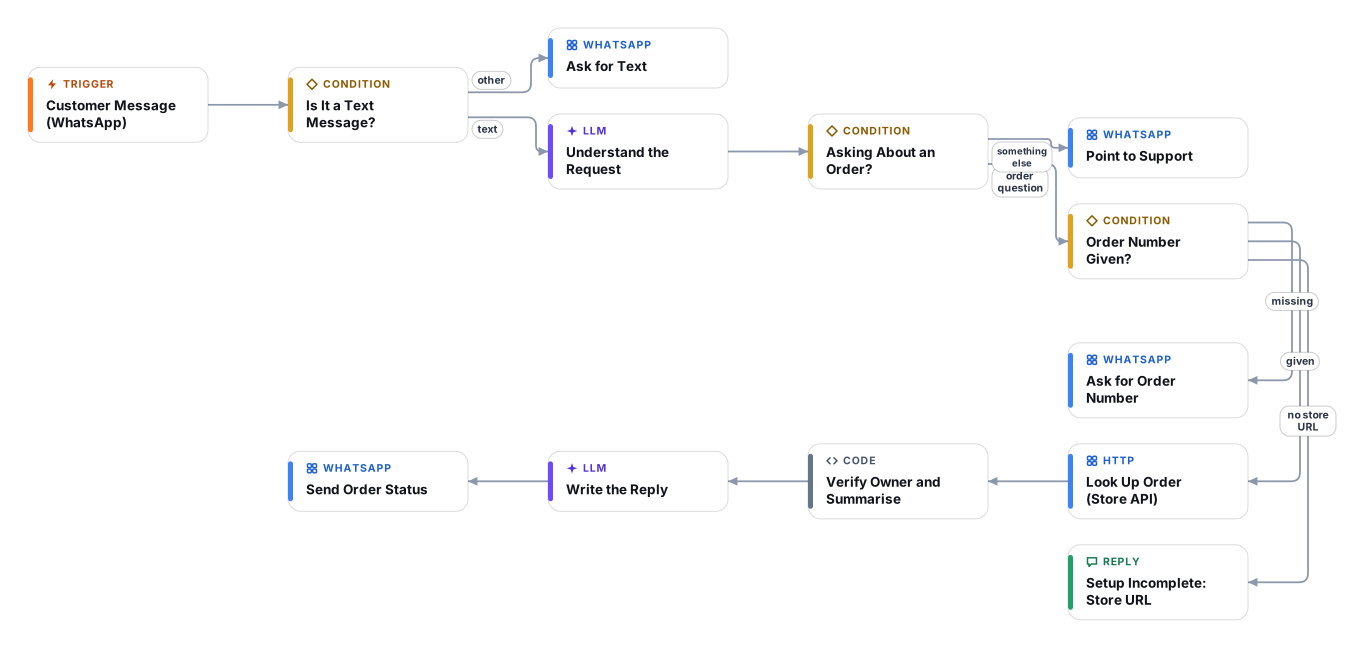
"Where is my order?" is the most common question an online store gets, and it is also the easiest one to automate safely. This template reads the customer's WhatsApp message, finds the order number (and asks for it if it is missing), looks the order up through your store's REST API, and replies with the status, the items, whether it has shipped and the carrier tracking details.
Privacy comes first. A small code step compares the last eight digits of the WhatsApp number with the phone numbers stored on the order. If they do not match, the customer is told that details can only be shared with the number used for the order, and no order information is shown. The reply is written only from a short verified summary, in the customer's language, and the writer is forbidden to invent delivery dates or tracking numbers.
Be aware of what is placeholder here: the store domain, API version and API token are values you supply, and the default request is shaped for the Shopify Admin API (orders by name). WooCommerce and other stores work through the same generic HTTP step with a different URL, query parameter and credential; the verification step already understands both shapes, and you can adapt its field names if your store differs. Plan about 40 minutes including a read-only API token and a test with a real order.
Good to know: Shopify only returns the last 60 days of orders unless your app has the read_all_orders scope. A wrong token or URL stops the run with an error in Executions rather than sending a wrong answer.
Text messages start a run. A fast model decides whether the customer is asking about an order and extracts the order number, also from the previous message.
If no order number was given, the customer is asked for it. Other topics receive a short pointer to your support contact.
A generic HTTP request calls your store's REST API with a read-only credential and requests only the fields needed.
A code step matches the order and compares the WhatsApp number with the phone numbers on the order. Only a verified, minimal summary continues.
The reply is written from the verified summary only, in the customer's language, with status, items and tracking. Unknown details are never guessed.
Anyone can read this page. Deploying the template into your workspace needs a Pro, Team or Enterprise plan. Starter workspaces can browse the library but cannot deploy templates. See plans.
You will connect OpenRouter API key, WhatsApp App (Meta App ID and Secret), WhatsApp API (access token and phone number ID) and fill in a few settings. Setup takes about 40 minutes. Your credentials stay in your own workspace.
Yes. Using the template creates a normal workflow in your workspace on the visual canvas. Rename it, edit any step, add approvals, test it and run it like any other workflow. It counts toward your plan’s workflow limit.
Yes. This workflow can send or write to external systems. Review the steps and test it with sample data before you activate it, and consider adding an approval step.
More workflows teams use alongside this one.
Answer customer questions on WhatsApp 24/7 from your own FAQs and policies, and alert your team when a person needs to step in.
KnOpCheck each refund or return request against your policy, get a person to approve, then call your refund endpoint and message the customer.
HT+1Detect Arabic or English (including Arabizi), answer in the customer's language from your knowledge base, and hand over to your team when needed.
KnOpEvery template is open to read. Deploying one into your workspace needs a Pro, Team or Enterprise plan; Starter workspaces can browse the whole library.