Customer SupportNew
WhatsApp order-status agent for online stores
Answer "where is my order?" on WhatsApp by looking the order up in your store API, sharing details only with the verified phone number.
 HTOp
Check each refund or return request against your policy, get a person to approve, then call your refund endpoint and message the customer.
Included in Pro and aboveStarter workspaces can read this template but not deploy it.
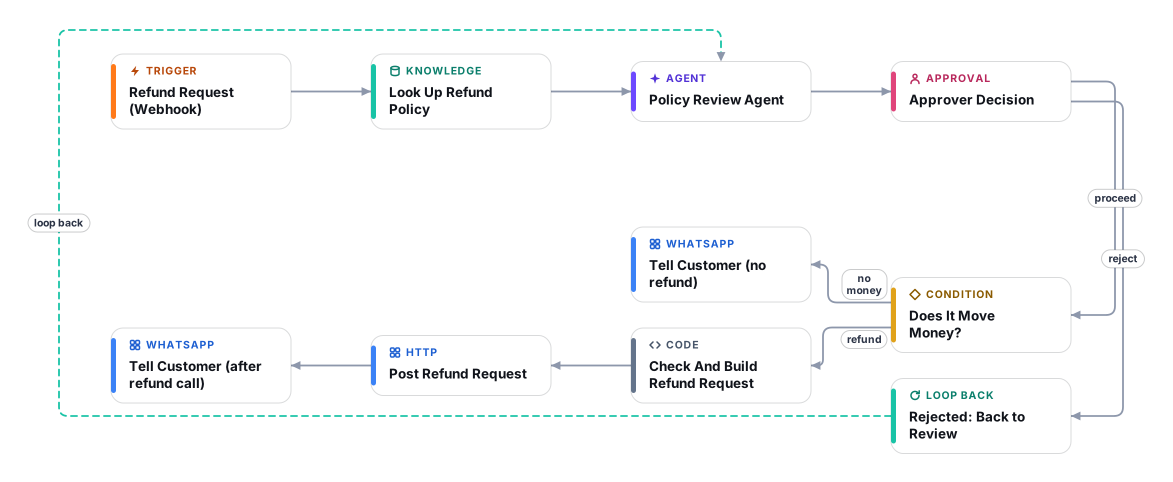
Refund requests are repetitive, rule-based and risky: refund too easily and you lose money, refuse wrongly and you lose the customer. This template does the policy work and leaves the decision to a person. Your store, helpdesk or an automation tool posts each request to the flow, an AI agent compares it with your refund and returns policy (including the return window and the dates), and recommends one of five outcomes: full refund, partial refund, exchange or store credit, decline, or manual review.
A person then sees a plain briefing in the Approvals inbox: what was asked, which policy rule applies, the recommended amount, risk flags such as "outside return window" or "high value", and the exact WhatsApp message the customer would receive. Approve to proceed, or reject with feedback and the agent revises (up to two rounds). Nothing is refunded and nobody is contacted before approval.
On approval, if the outcome moves money, the flow posts the approved request to a refund endpoint that you provide (for example a small Shopify or WooCommerce admin script, or an automation webhook that notifies finance). Cadrix never touches your payment provider directly, and the customer is only told once that call succeeds.
Plan about 40 minutes. Expect to spend most of it on your refund policy document and on the endpoint that executes refunds. The webhook is secured with a token header and replies to your store immediately, so checkout or helpdesk systems are never left waiting.
A secured webhook receives the order number, customer, WhatsApp number, reason, totals and dates. It answers immediately so your system is never kept waiting.
Your refund and returns policy is searched for the rules that match the request type, the reason and the items.
It checks dates against the return window, caps amounts at the order total, applies only deductions the policy states, adds risk flags, and drafts the customer message.
The approver sees the recommendation, the policy reference and the exact customer message. Rejecting with feedback sends it back for revision, up to two rounds, then the flow stops safely.
If money moves, the approved request is posted to your refund endpoint first. Only then does the customer receive the WhatsApp message. Other outcomes send the message directly.
Anyone can read this page. Deploying the template into your workspace needs a Pro, Team or Enterprise plan. Starter workspaces can browse the library but cannot deploy templates. See plans.
You will connect OpenRouter API key, WhatsApp API (access token and phone number ID) and fill in a few settings. Setup takes about 40 minutes. Your credentials stay in your own workspace.
Yes. Using the template creates a normal workflow in your workspace on the visual canvas. Rename it, edit any step, add approvals, test it and run it like any other workflow. It counts toward your plan’s workflow limit.
No. This template includes a human approval step, so the workflow pauses and waits for a person before the action goes ahead. Every decision is kept in the run history.
More workflows teams use alongside this one.
Answer "where is my order?" on WhatsApp by looking the order up in your store API, sharing details only with the verified phone number.
HTOpLabel every support email, draft a reply from your knowledge base, and send it only after an approver clicks Approve in their inbox.
 KnOp
Answer customer questions on WhatsApp 24/7 from your own FAQs and policies, and alert your team when a person needs to step in.
KnOpEvery template is open to read. Deploying one into your workspace needs a Pro, Team or Enterprise plan; Starter workspaces can browse the whole library.