Customer SupportNew
WhatsApp AI support agent with your knowledge base
Answer customer questions on WhatsApp 24/7 from your own FAQs and policies, and alert your team when a person needs to step in.
 KnOp
Label every support email, draft a reply from your knowledge base, and send it only after an approver clicks Approve in their inbox.
Included in Pro and aboveStarter workspaces can read this template but not deploy it.
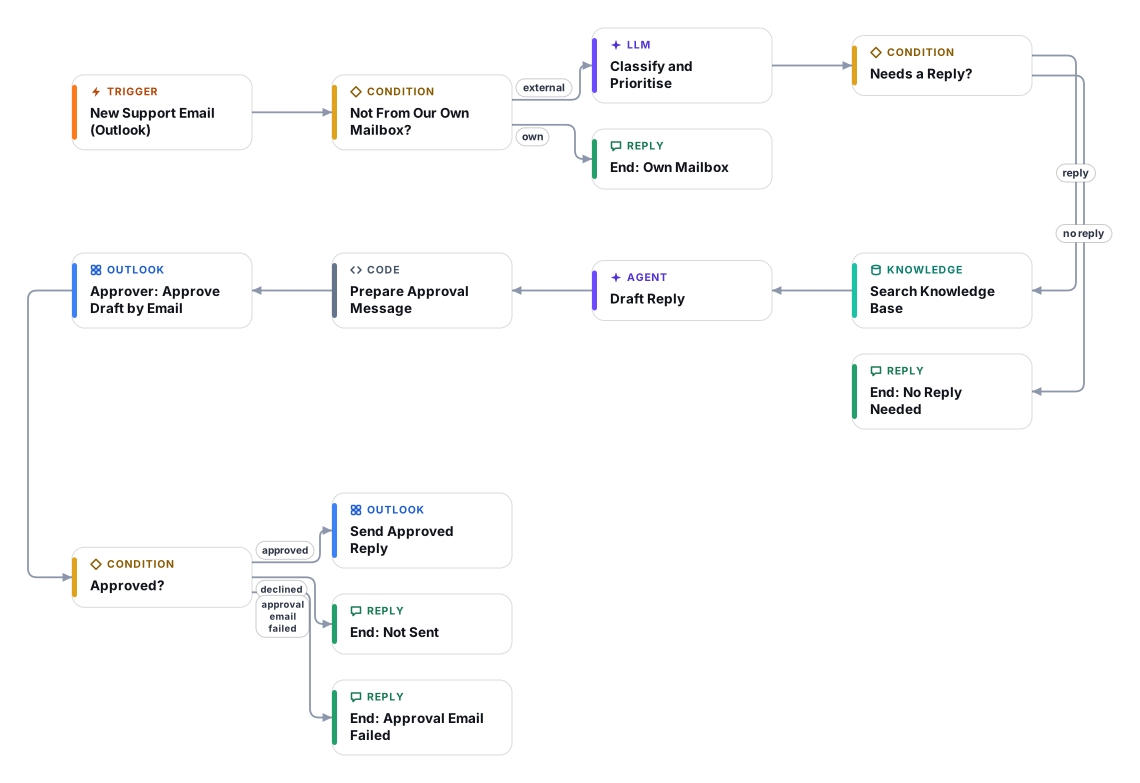
This template watches a Microsoft 365 / Outlook support mailbox and does the slow part of support for you. Each new unread email is labelled with a category, a priority, the sender's mood and a two-line summary. Spam, newsletters, bounces, out-of-office replies and anything from a no-reply address are filtered out. For real customer emails, an AI agent searches your knowledge base and drafts a reply in the sender's language.
Nothing is sent to the customer by the AI. The draft goes to your approver as an email with Approve and Do not send buttons, together with the category, priority, a confidence rating, whether the draft is based on your knowledge base, and what to double-check. Emails that look like legal, privacy, press or safety matters are flagged for senior review, and the draft for those is only a neutral acknowledgement. When the approver clicks Approve, the draft is sent as a reply in the original thread.
It suits small support teams and shared inboxes (support@, hello@, orders@) that want faster first responses without giving up control. Plan about 25 minutes: connect Outlook, upload your help-centre documents, set four variables, and test with a message to yourself.
Good to know: the approver sends the draft exactly as shown. To change wording, the approver clicks Do not send and replies from the mailbox. Only mail that arrives after you activate the workflow is processed, so your backlog is never touched.
The Outlook trigger checks the inbox every minute for new unread mail that arrived after activation. Mail from your own address is skipped.
A fast model sets category, priority, sender mood, language and a summary, flags legal or privacy topics for senior review, and drops spam and automated mail.
The agent searches your Document Store and writes a plain-text reply that may only use what it finds. If the answer is not there it writes an honest holding reply and tells the approver what is missing.
The approver receives the original context and the draft with one-click Approve and Do not send buttons. The run waits until they answer.
Only an approved draft is sent. If the approver declines, nothing is sent and the email stays in the inbox for a person to handle.
Anyone can read this page. Deploying the template into your workspace needs a Pro, Team or Enterprise plan. Starter workspaces can browse the library but cannot deploy templates. See plans.
You will connect OpenRouter API key, Microsoft Outlook 365 (OAuth) and fill in a few settings. Setup takes about 25 minutes. Your credentials stay in your own workspace.
Yes. Using the template creates a normal workflow in your workspace on the visual canvas. Rename it, edit any step, add approvals, test it and run it like any other workflow. It counts toward your plan’s workflow limit.
No. This template includes a human approval step, so the workflow pauses and waits for a person before the action goes ahead. Every decision is kept in the run history.
More workflows teams use alongside this one.
Answer customer questions on WhatsApp 24/7 from your own FAQs and policies, and alert your team when a person needs to step in.
KnOpDetect Arabic or English (including Arabizi), answer in the customer's language from your knowledge base, and hand over to your team when needed.
KnOpCheck each refund or return request against your policy, get a person to approve, then call your refund endpoint and message the customer.
HT+1Every template is open to read. Deploying one into your workspace needs a Pro, Team or Enterprise plan; Starter workspaces can browse the whole library.