Customer SupportNew
Bilingual Arabic and English support agent for WhatsApp
Detect Arabic or English (including Arabizi), answer in the customer's language from your knowledge base, and hand over to your team when needed.
 KnOp
Turn a catalogue sheet into native Arabic and English listings with titles, bullets and SEO keywords, written to a review tab after you approve.
Included in Pro and aboveStarter workspaces can read this template but not deploy it.
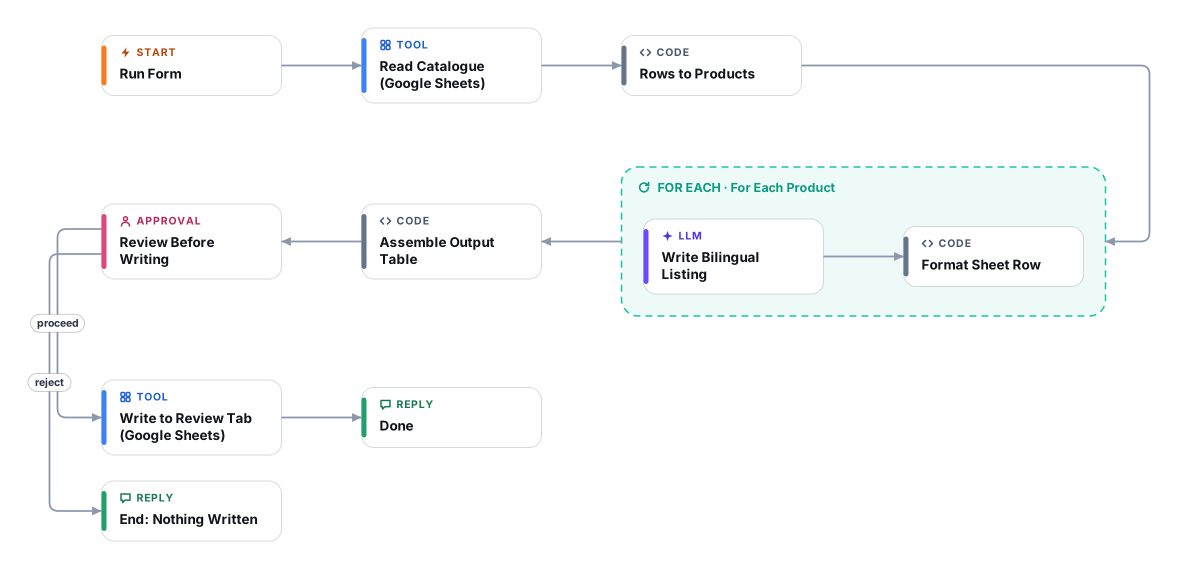
Writing product pages in two languages is slow, and machine-translated Arabic shows. This template reads the product catalogue you already keep in a Google Sheet and writes a complete listing for every row: an English and an Arabic title, a meta description, a description of 80 to 140 words, four to six bullets, and realistic SEO keywords in both languages. The Arabic is written natively for Gulf shoppers in Modern Standard Arabic, not translated word for word from the English.
It is careful about facts. The writer may only use what is in the row, so it will not invent materials, sizes, certifications or warranty terms; anything a shopper would expect but the row does not say is listed in a "Review flags" column for a person to check. It does not make health or safety claims, and it keeps brand names, model numbers and units as they are.
The flow is safe by design. It runs when you press Run and fill a short form (range, tone, how many products), writes only after a person approves a preview, and writes to a dedicated review range that it replaces on each run. Nothing is pushed to your store: you read, edit and import the result yourself.
Plan about 20 minutes: connect Google Sheets, share the sheet with that Google account, and run a first batch of five products to check the tone before you process the whole catalogue. Your sheet needs a header row; any column names work.
Enter the sheet range including the header row, pick a brand tone and set how many products to process, up to 100 per run.
The first row becomes the field names and every other row becomes one product, whatever columns you use.
A copywriting agent runs once per product and writes English and native Arabic titles, meta descriptions, descriptions, bullets and SEO keywords, using only facts from the row and flagging gaps.
All listings are assembled into one table with a header row, and a preview with the count and flagged rows is prepared.
After you approve the preview, the table is written to the output range of your spreadsheet. Review and edit it there before importing into your store.
Anyone can read this page. Deploying the template into your workspace needs a Pro, Team or Enterprise plan. Starter workspaces can browse the library but cannot deploy templates. See plans.
You will connect OpenRouter API key, Google Sheets (OAuth) and fill in a few settings. Setup takes about 20 minutes. Your credentials stay in your own workspace.
Yes. Using the template creates a normal workflow in your workspace on the visual canvas. Rename it, edit any step, add approvals, test it and run it like any other workflow. It counts toward your plan’s workflow limit.
No. This template includes a human approval step, so the workflow pauses and waits for a person before the action goes ahead. Every decision is kept in the run history.
More workflows teams use alongside this one.
Detect Arabic or English (including Arabizi), answer in the customer's language from your knowledge base, and hand over to your team when needed.
KnOpAnswer "where is my order?" on WhatsApp by looking the order up in your store API, sharing details only with the verified phone number.
HTOpTurn a short brief into native posts for each channel, approve or send them back, then queue the approved posts for publishing.
Every template is open to read. Deploying one into your workspace needs a Pro, Team or Enterprise plan; Starter workspaces can browse the whole library.