Marketing and ContentNew
Arabic and English product description generator from Google Sheets
Turn a catalogue sheet into native Arabic and English listings with titles, bullets and SEO keywords, written to a review tab after you approve.
 Op
Turn a short brief into native posts for each channel, approve or send them back, then queue the approved posts for publishing.
Included in Pro and aboveStarter workspaces can read this template but not deploy it.
Social teams lose hours rewriting the same announcement for LinkedIn, X and Instagram, then lose more time chasing approval. This template writes the first drafts and puts a person in charge of what goes out.
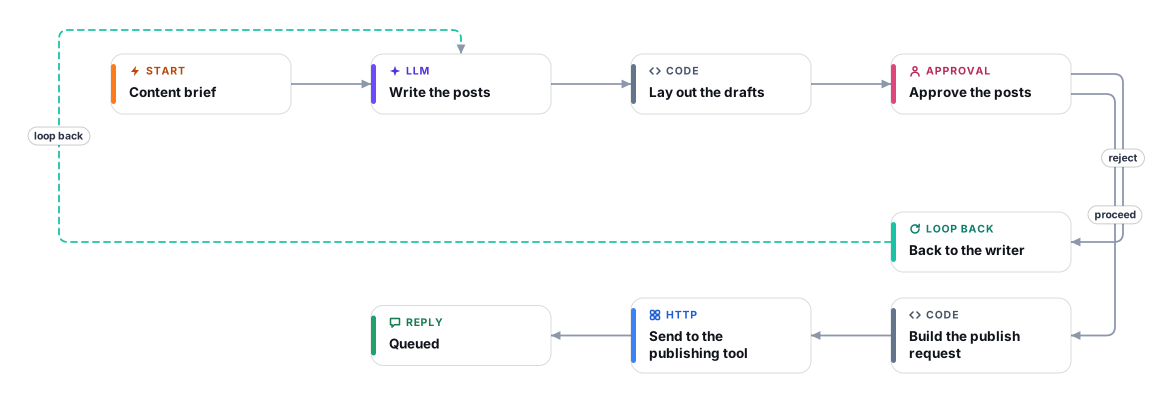
You fill in a short form: the topic, the channels, the tone, any link, the facts that must be right and when it should go live. An AI writer produces one native post per channel, following each channel's length habits and your brand voice, and lists every number or claim it used so the approver can check it. The drafts then wait in an approval step. Proceed continues; Reject sends them back with your notes for a rewrite, up to three rounds.
Only after approval are the posts sent, as one JSON request, to a webhook you control. Cadrix has no native social-network publishing node, so a scheduler such as Buffer, Make, Zapier, n8n or your own endpoint receives the request and does the actual scheduling for the time you gave. Nothing is published, and nothing leaves Cadrix, without an explicit approval.
A form asks for the topic, channels, tone, optional link, the facts that must be right and the planned publish time.
An AI writer produces one post per channel, written for that channel, in your brand voice. It uses only facts from the brief and lists every number or claim to verify.
The drafts are shown in an approval step. Proceed continues. Reject sends the drafts back with your feedback for a rewrite, up to three times.
The approved posts, with the publish time you gave, are POSTed as JSON to your publishing webhook. That tool schedules and publishes them.
The workflow replies with the response status from your publishing tool so you know the request was accepted.
Anyone can read this page. Deploying the template into your workspace needs a Pro, Team or Enterprise plan. Starter workspaces can browse the library but cannot deploy templates. See plans.
You will connect OpenRouter API key and fill in a few settings. Setup takes about 25 minutes. Your credentials stay in your own workspace.
Yes. Using the template creates a normal workflow in your workspace on the visual canvas. Rename it, edit any step, add approvals, test it and run it like any other workflow. It counts toward your plan’s workflow limit.
No. This template includes a human approval step, so the workflow pauses and waits for a person before the action goes ahead. Every decision is kept in the run history.
More workflows teams use alongside this one.
Turn a catalogue sheet into native Arabic and English listings with titles, bullets and SEO keywords, written to a review tab after you approve.
OpTurn a short request form into a branded PDF proposal with priced line items and VAT, then approve it before it is shared and emailed.

 Op
Check each refund or return request against your policy, get a person to approve, then call your refund endpoint and message the customer.
 HT+1
Every template is open to read. Deploying one into your workspace needs a Pro, Team or Enterprise plan; Starter workspaces can browse the whole library.