Sales and LeadsNew
Qualify inbound leads and log them to your CRM
Score every web-form lead against your ideal customer, log it to Google Sheets, create it in your CRM and alert sales about hot ones.
We
 HT+1
HT+1Turn a short request form into a branded PDF proposal with priced line items and VAT, then approve it before it is shared and emailed.
Included in Pro and aboveStarter workspaces can read this template but not deploy it.
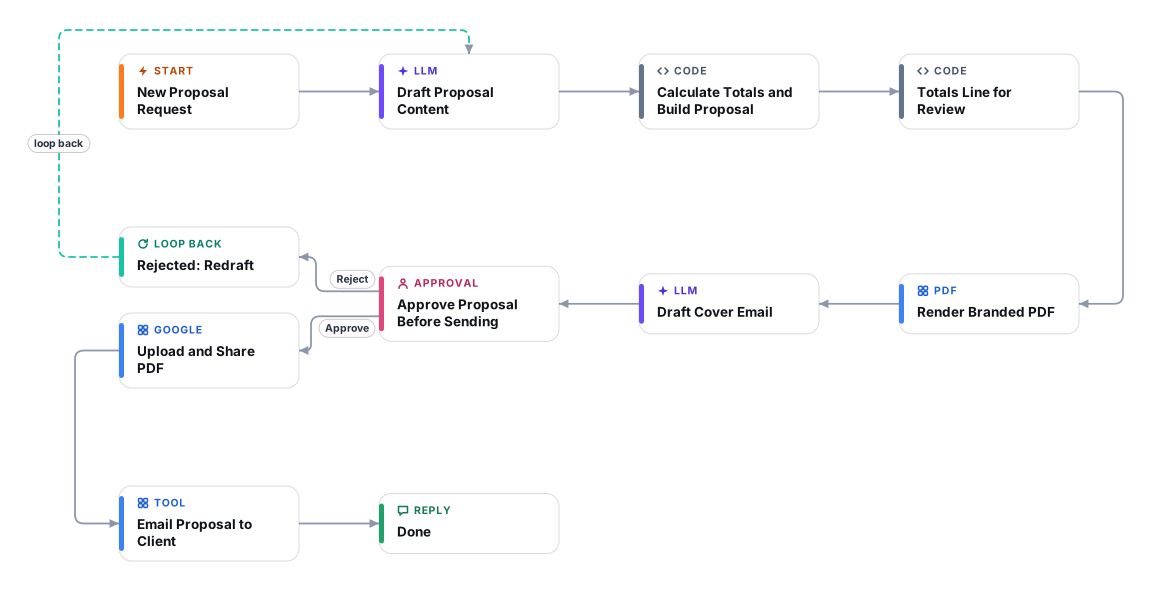
Writing proposals eats the time of the people who should be selling. With this template your team fills in a short form about the client and what they need, and gets back a complete, branded PDF proposal to review: summary, scope, deliverables, timeline, pricing, assumptions and payment terms.
The AI drafts the wording, but the money is handled carefully. It is instructed to price only services that exist on your rate card; a service it cannot price shows as "To be confirmed" in the document, any unit price that is not on your rate card is flagged for the reviewer, and the subtotal, VAT and total are calculated by code rather than by the model. You choose the VAT label and percentage (for example 5% VAT for the UAE), the currency (AED, SAR, USD and more) and whether the proposal is written in English or Arabic, including right-to-left layout.
Nothing leaves your company on its own. A person sees the pricing check, the questions the drafter could not resolve, the PDF and the cover email, then approves or rejects with comments. On approval the PDF is uploaded to your Google Drive, shared by link, and emailed to the client from your Gmail account. A rejection sends the comments back for a redraft, up to three times.
Enter the client, what they need, scope notes, budget range, currency, language (English or Arabic) and validity in days.
The AI writes the summary, scope, deliverables, timeline, line items, assumptions and payment terms from your request, your company description and your rate card only.
Code adds up the line items, applies your VAT, and builds the branded document with your colour and logo. A headless browser turns it into an A4 PDF with page numbers.
A short cover email is drafted in the same language, without prices or promises that are not in the request.
You see the pricing check, flagged open questions, the PDF and the email. Reject with comments to redraft, up to three times.
The approved PDF is uploaded to Google Drive with link sharing and the email with the link is sent to the client.
Anyone can read this page. Deploying the template into your workspace needs a Pro, Team or Enterprise plan. Starter workspaces can browse the library but cannot deploy templates. See plans.
You will connect OpenRouter API key, Google Drive, Gmail and fill in a few settings. Setup takes about 30 minutes. Your credentials stay in your own workspace.
Yes. Using the template creates a normal workflow in your workspace on the visual canvas. Rename it, edit any step, add approvals, test it and run it like any other workflow. It counts toward your plan’s workflow limit.
No. This template includes a human approval step, so the workflow pauses and waits for a person before the action goes ahead. Every decision is kept in the run history.
More workflows teams use alongside this one.
Score every web-form lead against your ideal customer, log it to Google Sheets, create it in your CRM and alert sales about hot ones.
HT+1An always-on WhatsApp assistant for UAE and GCC businesses: answers in English or Arabic, qualifies the lead, books a slot and alerts your team.

 Op
Reads a contract PDF from a legal inbox, flags clauses that break your playbook with verified quotes, and replies only after a lawyer approves.
 PDOp
Every template is open to read. Deploying one into your workspace needs a Pro, Team or Enterprise plan; Starter workspaces can browse the whole library.