Sales and LeadsNew
Reply to every WhatsApp enquiry in seconds, qualify and book
An always-on WhatsApp assistant for UAE and GCC businesses: answers in English or Arabic, qualifies the lead, books a slot and alerts your team.


 Op
Score every web-form lead against your ideal customer, log it to Google Sheets, create it in your CRM and alert sales about hot ones.
Included in Pro and aboveStarter workspaces can read this template but not deploy it.
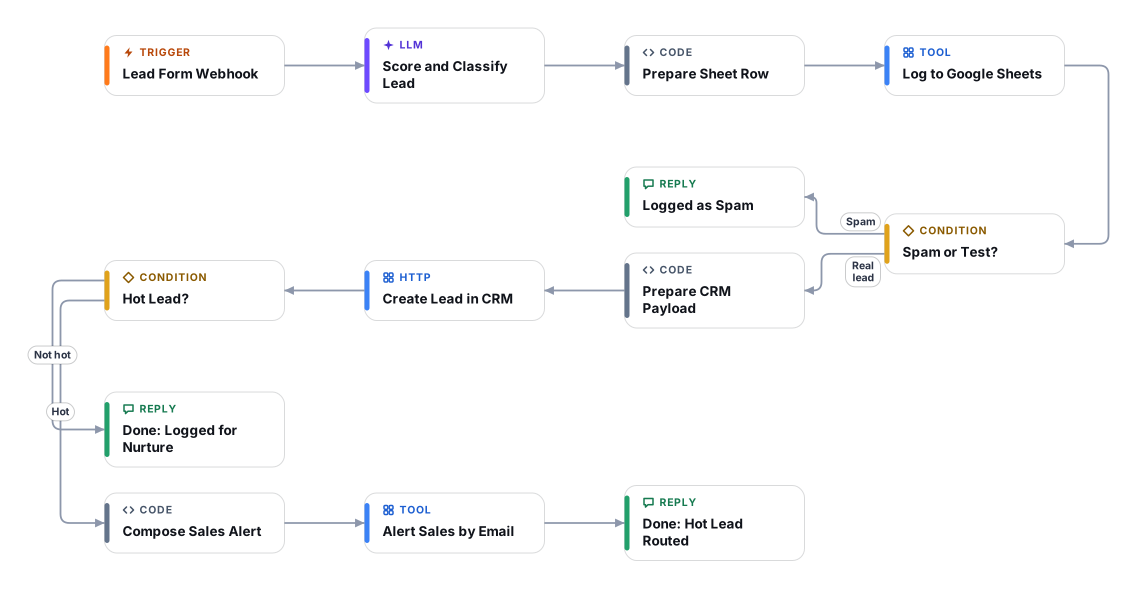
Every enquiry that lands on your website form, ad lead form or landing page gets read, scored and filed within seconds, so your sales team starts the day with a ranked list instead of a raw inbox.
The flow takes the form submission from a webhook, asks an AI model to score it from 0 to 100 against the ideal customer profile you write, and explains the score in plain words. Spam and test submissions are caught and kept out of your CRM. Every submission, spam included, is logged in a Google Sheet so you can audit how it is scoring.
Real leads are then created in your CRM through a simple HTTP call, which works with any CRM or automation tool that accepts JSON (a Zapier or Make catch hook, a HubSpot or Airtable API endpoint, your own system). Leads at or above your hot threshold also trigger an email to your sales inbox, including a draft reply for a person to review. The flow never contacts the lead itself.
Your form, ad platform or automation tool posts the lead (name, email, phone, company, message, source) to the flow webhook. The flow acknowledges the form straight away and works in the background.
An AI model scores the lead from 0 to 100 against your ideal customer profile and offer, assigns hot, warm, cold or spam, and writes short reasons. Text in the form is treated as data, never as instructions.
One row per submission is appended to your Google Sheet, including the score, tier and recommended next step. Cells are protected against spreadsheet formula injection.
Anything classed as spam stops here. It stays in the sheet for audit but is never sent to the CRM or to sales.
Real leads are posted as JSON to your CRM endpoint with the score, reasons, missing information and next step attached.
Leads at or above your threshold trigger an email to your sales address with the summary and a draft reply for a human to review and send.
Anyone can read this page. Deploying the template into your workspace needs a Pro, Team or Enterprise plan. Starter workspaces can browse the library but cannot deploy templates. See plans.
You will connect OpenRouter API key, Google Sheets, Gmail (sales alerts) and fill in a few settings. Setup takes about 20 minutes. Your credentials stay in your own workspace.
Yes. Using the template creates a normal workflow in your workspace on the visual canvas. Rename it, edit any step, add approvals, test it and run it like any other workflow. It counts toward your plan’s workflow limit.
Yes. This workflow can send or write to external systems. Review the steps and test it with sample data before you activate it, and consider adding an approval step.
More workflows teams use alongside this one.
An always-on WhatsApp assistant for UAE and GCC businesses: answers in English or Arabic, qualifies the lead, books a slot and alerts your team.
OpRead portal lead notification emails, log the lead and open a WhatsApp chat in seconds. Pairs with the WhatsApp responder for qualification and viewings.
OpTurn a short request form into a branded PDF proposal with priced line items and VAT, then approve it before it is shared and emailed.

 Op
Every template is open to read. Deploying one into your workspace needs a Pro, Team or Enterprise plan; Starter workspaces can browse the whole library.