Sales and LeadsNew
Reply to every WhatsApp enquiry in seconds, qualify and book
An always-on WhatsApp assistant for UAE and GCC businesses: answers in English or Arabic, qualifies the lead, books a slot and alerts your team.


 Op
Read portal lead notification emails, log the lead and open a WhatsApp chat in seconds. Pairs with the WhatsApp responder for qualification and viewings.
Included in Pro and aboveStarter workspaces can read this template but not deploy it.
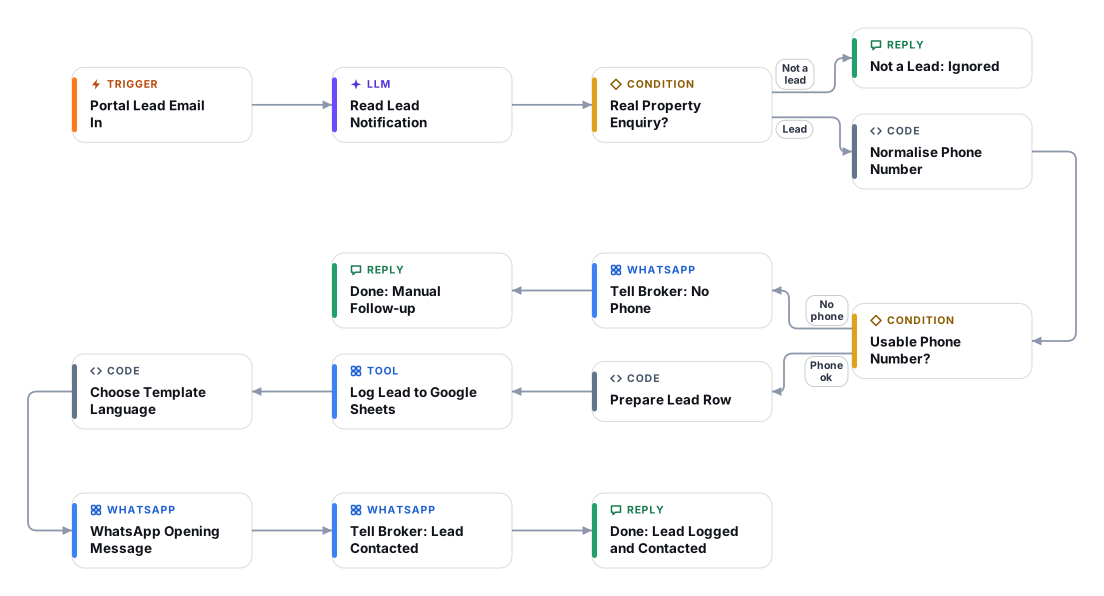
In Dubai and across the GCC, property leads arrive from the big portals as notification emails, and the broker who answers first usually gets the viewing. This template watches the mailbox that receives those notifications, reads each one, and starts a WhatsApp conversation with the enquirer within seconds.
To be clear about what it is: it does not connect to Bayut, Property Finder or any other portal API. It starts from the lead notification email that the portal already sends you, so it works with any portal whose notification contains the enquirer phone number. An AI model extracts the name, phone, property and message, because layouts differ by portal and change over time. Test it with real emails from your own account before relying on it.
For each real enquiry it normalises the phone number, logs the lead in a Google Sheet, sends your pre-approved WhatsApp opening template (English, or Arabic if the lead wrote in Arabic and you enabled the Arabic version), and tells the broker. The opening message is a fixed template, so no AI-written text is sent unreviewed. Qualification and viewing booking continue in the companion Speed-to-lead WhatsApp responder template, pointed at the same Google Sheet so it knows which property the lead asked about. Leads without a usable phone number are passed to the broker for manual follow-up.
Your portal sends its lead notification to a mailbox you connect. Set a sender filter so only portal notifications are read.
The model extracts the enquirer name, phone, email, property reference, rent or sale, budget and message. Emails that are not real enquiries are ignored.
Code converts local formats like 05x to international digits with your default country code, and sends leads without a valid number to the broker for manual follow-up.
A row with all the details goes to your Google Sheet, which the WhatsApp responder also uses for context.
Your approved opening template is sent in English or Arabic. The lead replies and the responder template takes over to qualify and book a viewing.
The broker gets a WhatsApp message with the lead summary straight away.
Anyone can read this page. Deploying the template into your workspace needs a Pro, Team or Enterprise plan. Starter workspaces can browse the library but cannot deploy templates. See plans.
You will connect OpenRouter API key, Portal notification mailbox (IMAP), Portal notification mailbox (Microsoft 365 OAuth), Google Sheets, WhatsApp Business Cloud API and fill in a few settings. Setup takes about 60 minutes. Your credentials stay in your own workspace.
Yes. Using the template creates a normal workflow in your workspace on the visual canvas. Rename it, edit any step, add approvals, test it and run it like any other workflow. It counts toward your plan’s workflow limit.
Yes. This workflow can send or write to external systems. Review the steps and test it with sample data before you activate it, and consider adding an approval step.
More workflows teams use alongside this one.
An always-on WhatsApp assistant for UAE and GCC businesses: answers in English or Arabic, qualifies the lead, books a slot and alerts your team.
OpScore every web-form lead against your ideal customer, log it to Google Sheets, create it in your CRM and alert sales about hot ones.
 HT+1
Detect Arabic or English (including Arabizi), answer in the customer's language from your knowledge base, and hand over to your team when needed.
KnOpEvery template is open to read. Deploying one into your workspace needs a Pro, Team or Enterprise plan; Starter workspaces can browse the whole library.