OperationsNew
Turn any PDF or scan into structured data and Excel (Vision mode)
Upload a PDF, scan or photo to a Document Store, name the fields you need, and get a checked Excel file. Doubtful values go to a human.
KnExOp
Reads a contract PDF from a legal inbox, flags clauses that break your playbook with verified quotes, and replies only after a lawyer approves.
Included in Pro and aboveStarter workspaces can read this template but not deploy it.
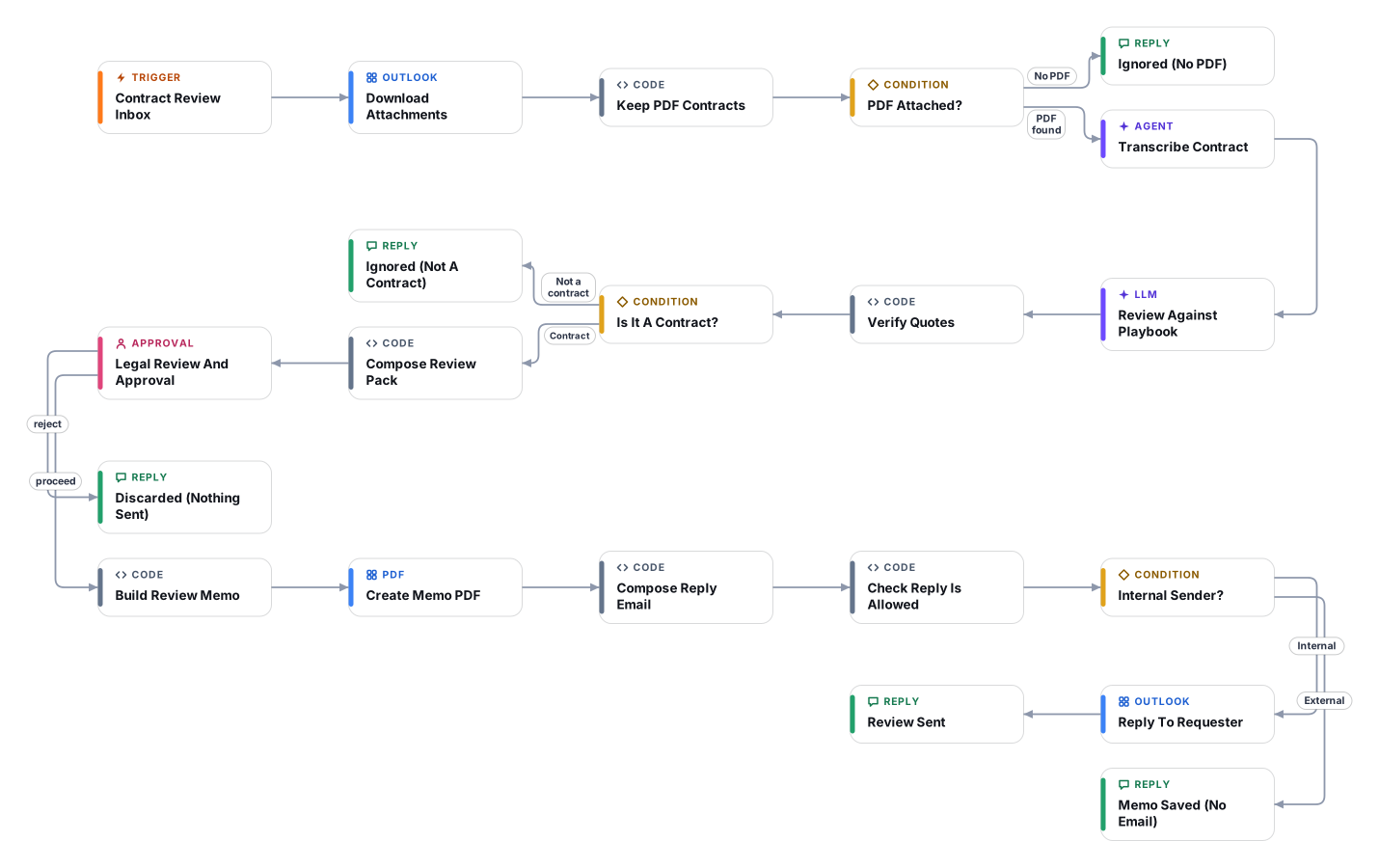
Legal teams spend hours on first-pass contract reads. This workflow watches a legal mailbox for emails with a PDF contract, has a model transcribe the whole document word for word, and then reviews that text against your own playbook: liability caps, indemnities, termination, auto-renewal, payment terms, governing law, IP, confidentiality, data protection, restrictions and missing basics. A default playbook is included and you edit it to match your company positions, your role in the deal and your preferred law and forum.
Trust is built in. Every flagged clause must quote the exact words from the contract. Code then checks that each quote really exists in the transcription, and marks any that do not as unverified. Absent protections are listed separately and only when the whole text has been read. Short, unreadable or partial transcriptions are called out. The model is instructed never to say what the law is or whether a clause is enforceable; it describes what a clause says and why it conflicts with your playbook, and suggests what a lawyer could ask for instead.
A lawyer receives the full pack in the Cadrix approval inbox and adds comments. Only on approval does the workflow build a review memo PDF and, if the sender is on your internal email domain, send a reply with the summary, the main points that were verified and the legal comments. Contracts sent in by the other side get the memo but never an email, so your negotiating positions cannot leak. Rejecting sends nothing. This is an assistant for qualified lawyers, not a substitute for legal advice; do not use it for contracts where a miss would be unacceptable without a full human read. Contract text is sent to the AI model through OpenRouter, so check that this is acceptable under your confidentiality obligations and data policies.
The Outlook 365 trigger picks up new unread email in the legal inbox and downloads attachments. Only PDFs are kept (up to three).
A vision model transcribes the complete contract word for word, keeping clause numbers and page markers, in English or Arabic.
A second model compares the transcription with your playbook, role and preferred law, and returns findings with clause numbers, exact quotes, severity and a suggested ask.
Code looks for every quote in the transcription, marks unverified ones, sorts by severity and flags short, partial or illegible transcriptions.
The full pack goes to a lawyer in the approval inbox. The lawyer adds comments and approves or rejects. Non-contracts are dropped earlier.
On approval a review memo PDF is created and for internal senders a reply with the summary, main points and legal comments is sent. On rejection nothing is sent.
Anyone can read this page. Deploying the template into your workspace needs a Pro, Team or Enterprise plan. Starter workspaces can browse the library but cannot deploy templates. See plans.
You will connect OpenRouter API key, Microsoft Outlook 365 OAuth and fill in a few settings. Setup takes about 30 minutes. Your credentials stay in your own workspace.
Yes. Using the template creates a normal workflow in your workspace on the visual canvas. Rename it, edit any step, add approvals, test it and run it like any other workflow. It counts toward your plan’s workflow limit.
No. This template includes a human approval step, so the workflow pauses and waits for a person before the action goes ahead. Every decision is kept in the run history.
More workflows teams use alongside this one.
Upload a PDF, scan or photo to a Document Store, name the fields you need, and get a checked Excel file. Doubtful values go to a human.
Reads supplier invoices from Outlook and checks the TRN, 5% VAT maths and AED details. Problem invoices go to your accountant, results to Sheets.

 Op
Reads PDF or scanned invoices from a mailbox, checks the numbers, and logs each one to Google Sheets only after a person approves it.
OpEvery template is open to read. Deploying one into your workspace needs a Pro, Team or Enterprise plan; Starter workspaces can browse the whole library.