Finance and AccountingNew
Validate UAE VAT tax invoices (TRN, 5% VAT, AED, Arabic or English)
Reads supplier invoices from Outlook and checks the TRN, 5% VAT maths and AED details. Problem invoices go to your accountant, results to Sheets.

 Op
Reads PDF or scanned invoices from a mailbox, checks the numbers, and logs each one to Google Sheets only after a person approves it.
Included in Pro and aboveStarter workspaces can read this template but not deploy it.
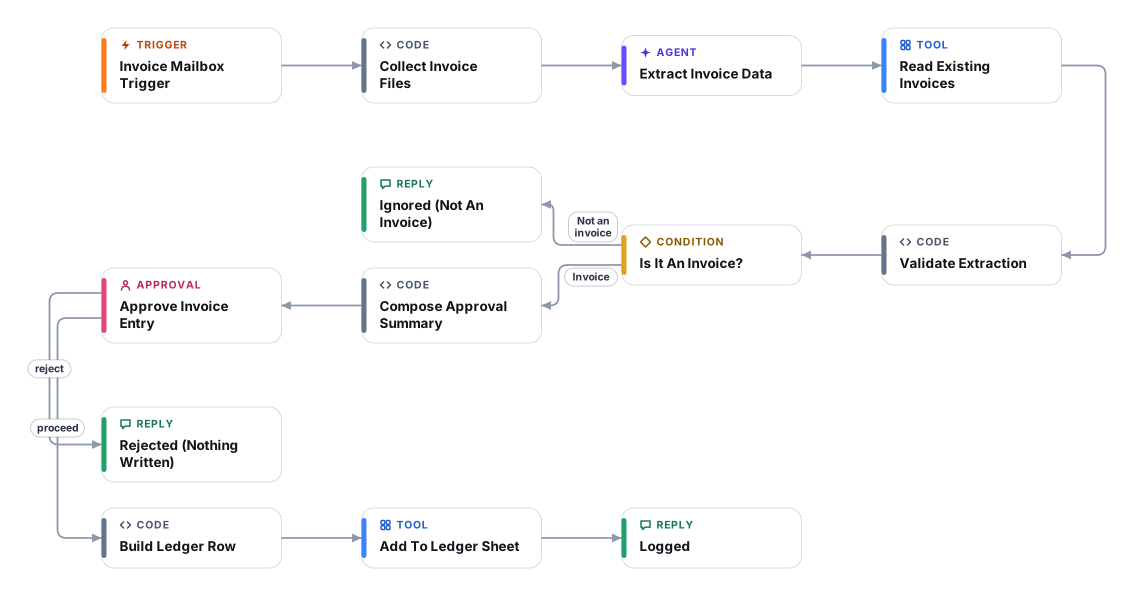
Accounts-payable teams still re-type supplier invoices from email into a spreadsheet. This workflow watches an invoice mailbox, sends each PDF or image attachment to a vision model, and returns the vendor, invoice number, dates, currency, subtotal, tax and total as structured fields. The model is told to copy what is printed and never to calculate, so an unreadable amount stays empty instead of turning into a wrong number.
Plain code then checks the result: required fields, subtotal plus tax against total, line items against subtotal, impossible or old dates, low confidence, and whether the same invoice number from the same vendor is already in your ledger sheet. Mentions of changed bank details are flagged for a call-back, a common invoice-fraud pattern. Documents that are not invoices (statements, quotes, newsletters) are ignored.
Every invoice then waits for a person in the Cadrix approval inbox. The approver sees the extracted values next to the list of things to check, and can add a note. Only an approved invoice is appended to your Google Sheet. The workflow never pays anything and never emails the supplier. It works with any IMAP mailbox, including Gmail and Microsoft 365.
The Email Trigger fires for each new message and downloads attachments (up to 10 MB each). Use a dedicated mailbox or forwarding address for supplier invoices.
A small code step keeps PDF, PNG, JPEG and WebP attachments (max 4) and passes them to the model. Other file types are skipped.
A vision model via OpenRouter extracts the fields exactly as printed, in English or Arabic, and reports its confidence and any fields it was unsure about.
The flow reads your ledger sheet and runs deterministic checks: missing fields, arithmetic, dates, payment-detail changes and duplicate invoice numbers.
A person reviews the extracted values and the list of concerns in the approval inbox, then approves or rejects. Non-invoices are dropped before this step.
Approved invoices are appended to the Google Sheet as one row, with the flags and the approver note saved alongside.
Anyone can read this page. Deploying the template into your workspace needs a Pro, Team or Enterprise plan. Starter workspaces can browse the library but cannot deploy templates. See plans.
You will connect OpenRouter API key, Mailbox (IMAP) credential, Mailbox (Microsoft 365 IMAP OAuth), Google Sheets OAuth and fill in a few settings. Setup takes about 20 minutes. Your credentials stay in your own workspace.
Yes. Using the template creates a normal workflow in your workspace on the visual canvas. Rename it, edit any step, add approvals, test it and run it like any other workflow. It counts toward your plan’s workflow limit.
No. This template includes a human approval step, so the workflow pauses and waits for a person before the action goes ahead. Every decision is kept in the run history.
More workflows teams use alongside this one.
Reads supplier invoices from Outlook and checks the TRN, 5% VAT maths and AED details. Problem invoices go to your accountant, results to Sheets.
OpUpload a PDF, scan or photo to a Document Store, name the fields you need, and get a checked Excel file. Doubtful values go to a human.
Employees send a receipt photo on WhatsApp. AI reads and categorises it, they confirm, and big or doubtful ones go to a manager before Sheets.
 HTOp
Every template is open to read. Deploying one into your workspace needs a Pro, Team or Enterprise plan; Starter workspaces can browse the whole library.