Finance and AccountingNew
Extract invoices from email into Google Sheets with approval
Reads PDF or scanned invoices from a mailbox, checks the numbers, and logs each one to Google Sheets only after a person approves it.
Em Op
OpUpload a PDF, scan or photo to a Document Store, name the fields you need, and get a checked Excel file. Doubtful values go to a human.
Included in Pro and aboveStarter workspaces can read this template but not deploy it.
Most documents arrive as PDFs, scans or phone photos, and the data inside has to be typed into something else. This workflow reads a document that you have loaded into a Cadrix Document Store with the PDF loader in Vision mode, which renders every page and lets a vision model read it. That works for scans, screenshots, tables, handwriting-like fonts and Arabic as well as English. You type the list of fields you want, such as "invoice number, total, due date, customer name", and the workflow returns each one with its value, page, confidence and a quoted snippet from the document.
Accuracy comes from verification, not from trust. The model may only copy values it can quote. A code step then searches the document text for the quoted snippet and for the value itself. Anything that cannot be found, that has less than high confidence, or that conflicts with another part of the document is marked CHECK, and fields that are simply not in the document are marked NOT FOUND instead of being filled in. Requested tables are written one sheet each.
The result is an Excel file with a Fields sheet, any table sheets and a Review Notes sheet. Clean extractions finish straight away. If anything was flagged, a person opens the file, compares the CHECK rows with the original and approves or rejects it before the data is used. Vision reading uses your OpenRouter credits for every page, so keep one document per store and start with short documents. Because the reader is only as good as the stored text, re-upsert after replacing a document.
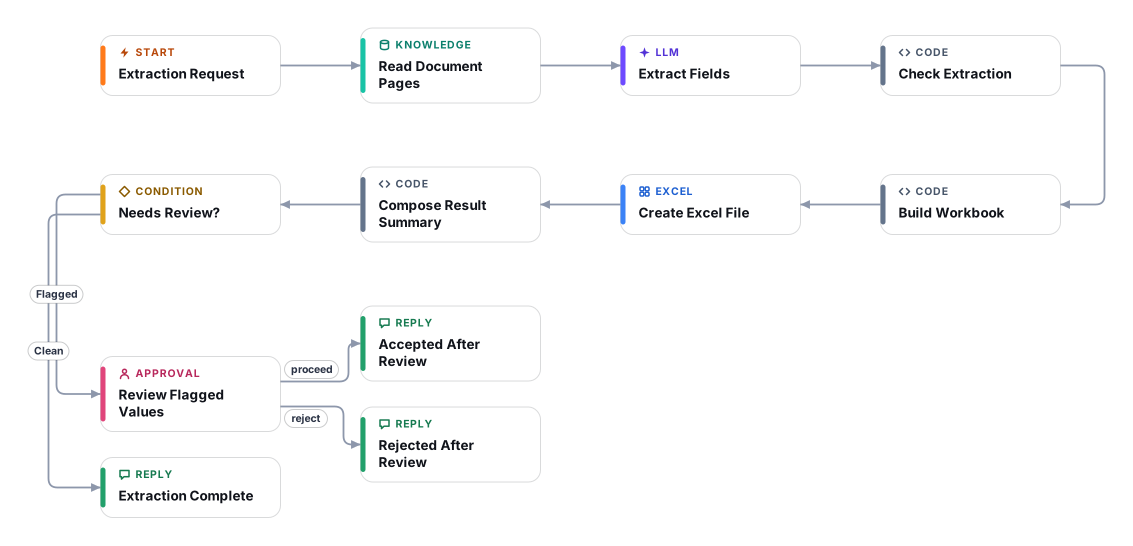
In Document Stores, add the Pdf File loader with Extraction Mode set to Vision, upload the document and upsert. Raise Top K so every page is retrieved.
Run the form and list the fields to extract, plus an optional document type and file name.
The Retriever step pulls the page text, with page metadata, from your store.
A model returns one entry per requested field, with the value as printed, a confidence level, the page and an exact quoted snippet. Missing values stay empty.
Code searches the document for each snippet and value, marks OK, CHECK or NOT FOUND, and builds the workbook with a Review Notes sheet.
Clean results finish immediately. Flagged results wait for a person who compares the CHECK rows with the original and approves or rejects.
Anyone can read this page. Deploying the template into your workspace needs a Pro, Team or Enterprise plan. Starter workspaces can browse the library but cannot deploy templates. See plans.
You will connect OpenRouter API key. Setup takes about 15 minutes. Your credentials stay in your own workspace.
Yes. Using the template creates a normal workflow in your workspace on the visual canvas. Rename it, edit any step, add approvals, test it and run it like any other workflow. It counts toward your plan’s workflow limit.
No. This template includes a human approval step, so the workflow pauses and waits for a person before the action goes ahead. Every decision is kept in the run history.
More workflows teams use alongside this one.
Reads PDF or scanned invoices from a mailbox, checks the numbers, and logs each one to Google Sheets only after a person approves it.
OpReads supplier invoices from Outlook and checks the TRN, 5% VAT maths and AED details. Problem invoices go to your accountant, results to Sheets.
 Op
Reads a contract PDF from a legal inbox, flags clauses that break your playbook with verified quotes, and replies only after a lawyer approves.
PDOpEvery template is open to read. Deploying one into your workspace needs a Pro, Team or Enterprise plan; Starter workspaces can browse the whole library.