Finance and AccountingNew
Extract invoices from email into Google Sheets with approval
Reads PDF or scanned invoices from a mailbox, checks the numbers, and logs each one to Google Sheets only after a person approves it.
Em Op
OpReads supplier invoices from Outlook and checks the TRN, 5% VAT maths and AED details. Problem invoices go to your accountant, results to Sheets.
Included in Pro and aboveStarter workspaces can read this template but not deploy it.
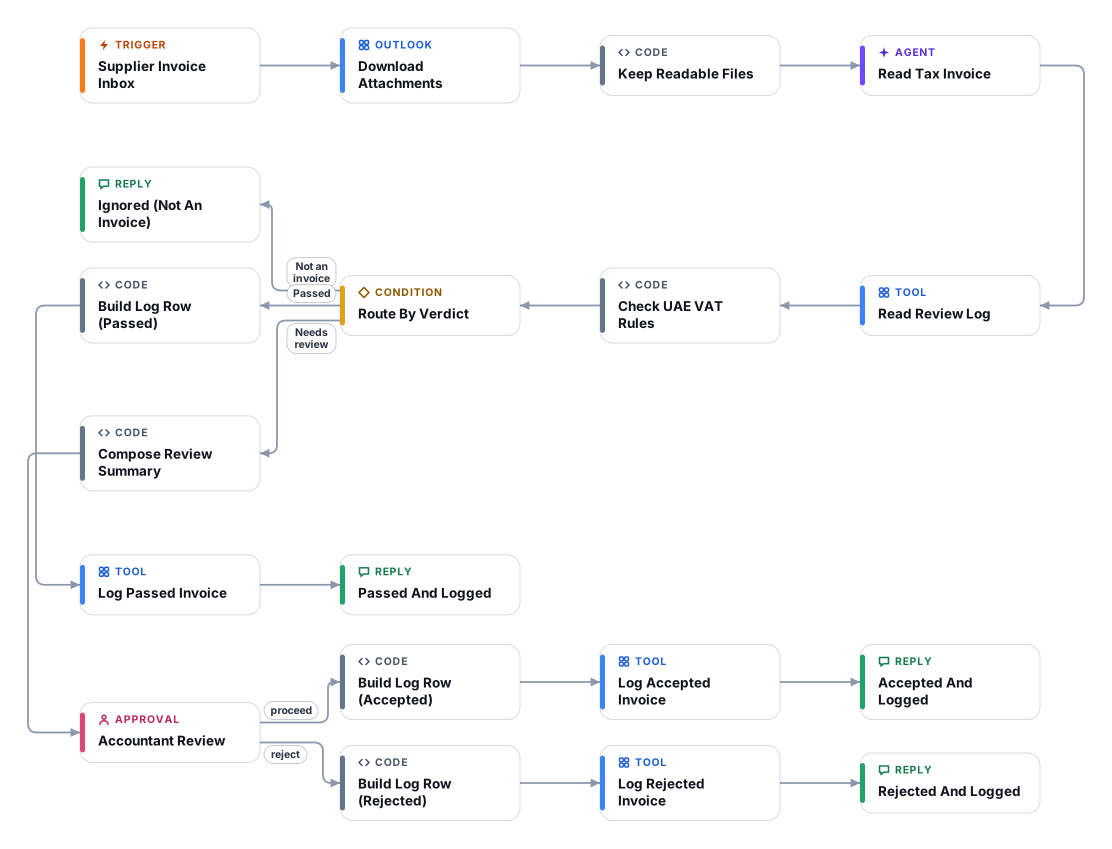
UAE businesses that want to recover input VAT need supplier invoices that carry the right particulars. This workflow reads each PDF or scanned invoice that arrives in a Microsoft 365 mailbox, in English, Arabic or both, and transcribes the fields a tax invoice should show: the words "Tax Invoice", supplier name and address, the supplier and customer Tax Registration Numbers (TRN), invoice number and date, currency, amounts before VAT, VAT and total. Arabic-Indic digits are converted to ordinary digits.
A separate code step then applies a checklist: the supplier TRN must have 15 digits, VAT must be 5% of the taxable amount (within rounding), taxable amount plus VAT must equal the total, foreign-currency invoices must show the VAT in AED, the customer TRN should match your own, and the same invoice number must not already be in your log. Clean invoices are logged automatically. Anything else goes to an accountant in the Cadrix approval inbox with the exact list of problems, and the decision is logged too. Nothing is ever sent to the supplier.
Sources used for the checklist: the Federal Decree-Law No. 8 of 2017 on VAT (standard rate 5%), the Executive Regulation (Cabinet Decision No. 52 of 2017) and Federal Tax Authority guidance on tax invoices at tax.gov.ae. These rules change and have exceptions (for example simplified tax invoices, zero-rated and exempt supplies, credit notes), so this template is an aid, not tax advice: validate the checklist with your accountant before relying on it. The UAE e-invoicing programme is being phased in; this template does not issue or transmit e-invoices, so check current timelines with the authorities.
The Outlook 365 trigger picks up new unread messages. Attachments are downloaded and only PDFs and real images are kept.
A vision model reads English and Arabic documents and copies the tax-invoice particulars exactly as printed. Missing items stay empty instead of being guessed.
The flow reads your review log in Google Sheets so the same supplier and invoice number are not accepted twice.
A code step checks TRN length, tax-invoice wording, 5% VAT, totals, AED VAT on foreign-currency invoices, customer TRN and dates, and sets a verdict: PASS, REVIEW, FAIL or SKIP.
REVIEW and FAIL invoices go to an accountant with the full list of findings. Passed invoices are logged without interrupting anyone.
Every outcome, including rejections and reviewer notes, is appended to the Google Sheet. The flow never contacts the supplier.
Anyone can read this page. Deploying the template into your workspace needs a Pro, Team or Enterprise plan. Starter workspaces can browse the library but cannot deploy templates. See plans.
You will connect OpenRouter API key, Microsoft Outlook 365 OAuth, Google Sheets OAuth and fill in a few settings. Setup takes about 25 minutes. Your credentials stay in your own workspace.
Yes. Using the template creates a normal workflow in your workspace on the visual canvas. Rename it, edit any step, add approvals, test it and run it like any other workflow. It counts toward your plan’s workflow limit.
No. This template includes a human approval step, so the workflow pauses and waits for a person before the action goes ahead. Every decision is kept in the run history.
More workflows teams use alongside this one.
Reads PDF or scanned invoices from a mailbox, checks the numbers, and logs each one to Google Sheets only after a person approves it.
OpUpload a PDF, scan or photo to a Document Store, name the fields you need, and get a checked Excel file. Doubtful values go to a human.
Reads a contract PDF from a legal inbox, flags clauses that break your playbook with verified quotes, and replies only after a lawyer approves.
 PDOp
Every template is open to read. Deploying one into your workspace needs a Pro, Team or Enterprise plan; Starter workspaces can browse the whole library.