OperationsNew
Restaurant and hotel WhatsApp reservations and FAQ
Answer guest questions on WhatsApp and take table or slot reservation requests that your staff approve before they are confirmed.
 Kn
 Op
Answer parent and applicant questions on WhatsApp from your own admissions documents, show each parent their own fee status, hand over when needed.
Included in Pro and aboveStarter workspaces can read this template but not deploy it.
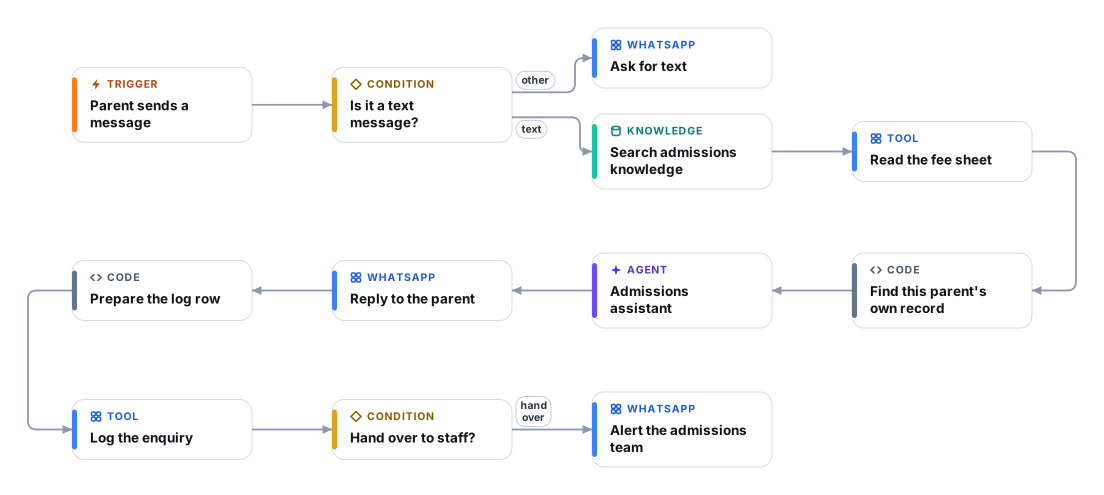
Admissions offices answer the same questions all day: fees, deadlines, documents, programmes. This template puts a WhatsApp assistant in front of those questions and keeps a person close for everything it should not answer alone.
When a message arrives, the workflow searches your admissions knowledge base, reads your fee sheet, and keeps only the row that matches the sender's own WhatsApp number so nobody else's data ever reaches the AI. The assistant answers in the sender's language, quotes fees and dates exactly as published, and refuses to guess. If the answer is not in your documents, if the parent is upset or asks for a person, or if the question is about aid, refunds, visas or an admission decision, it says the admissions team will follow up and sends your staff a WhatsApp hand-over with the reason.
Every enquiry is logged to a Google Sheet with the intent, language and whether it was handed over, using only the last four digits of the phone number, so you can see what parents ask most and where the knowledge base has gaps. Proactive fee reminders are a separate scheduled workflow and are not part of this template.
The WhatsApp Trigger starts the workflow for every incoming message. Non-text messages get a polite request to type the question.
The Retriever looks up the passages in your admissions Document Store that match the question. These are the only source for fees, dates and requirements.
Your fee sheet is read and a code step keeps only the rows whose WhatsApp number matches the sender. If none match, the assistant is told there is no record.
The assistant replies in the sender's language, under 600 characters, from the knowledge and the matching fee record only. It decides whether a person must follow up and why.
A row with the intent, language, hand-over flag and the last four digits of the number goes to a Google Sheet. If a person must follow up, your staff number gets a WhatsApp with the reason and the message.
Anyone can read this page. Deploying the template into your workspace needs a Pro, Team or Enterprise plan. Starter workspaces can browse the library but cannot deploy templates. See plans.
You will connect OpenRouter API key, WhatsApp Cloud API app (trigger), WhatsApp Cloud API access (send), Google Sheets and fill in a few settings. Setup takes about 45 minutes. Your credentials stay in your own workspace.
Yes. Using the template creates a normal workflow in your workspace on the visual canvas. Rename it, edit any step, add approvals, test it and run it like any other workflow. It counts toward your plan’s workflow limit.
Yes. This workflow can send or write to external systems. Review the steps and test it with sample data before you activate it, and consider adding an approval step.
More workflows teams use alongside this one.
Answer guest questions on WhatsApp and take table or slot reservation requests that your staff approve before they are confirmed.
KnOpDetect Arabic or English (including Arabizi), answer in the customer's language from your knowledge base, and hand over to your team when needed.
KnOpAnswer customer questions on WhatsApp 24/7 from your own FAQs and policies, and alert your team when a person needs to step in.
KnOpEvery template is open to read. Deploying one into your workspace needs a Pro, Team or Enterprise plan; Starter workspaces can browse the whole library.