Sales and LeadsNew
Reply to every WhatsApp enquiry in seconds, qualify and book
An always-on WhatsApp assistant for UAE and GCC businesses: answers in English or Arabic, qualifies the lead, books a slot and alerts your team.


 Op
A WhatsApp booking assistant for clinics. The AI sees only a first name, appointment type and slot, never health data or phone numbers.
Included in Pro and aboveStarter workspaces can read this template but not deploy it.
Clinics lose bookings every day to unanswered WhatsApp messages. This template lets patients book appointments over WhatsApp at any hour, in English or Arabic, while keeping health information away from the AI model by design.
Design rule: the AI model only ever sees the patient first name, the type of appointment, the time slot and the booking conversation itself. It never receives a phone number, a patient record or any clinical information. Two layers enforce this. First, before any AI runs, plain code scans every incoming message: emergency wording gets a fixed emergency reply, and anything that looks clinical, any long narrative, and any non-text message such as a voice note or photo is not sent to the model at all. The patient gets a fixed booking-only message and your staff are told. Second, the assistant is instructed to refuse medical topics and hand over. Patients can still type health details in a free-text message, so the guard is strong but not a guarantee (it screens common English and Arabic wording by keyword and will miss some phrasings, and it errs towards sending a message to staff), and your privacy notice should say the chat is handled by an automated assistant.
For a booking, the assistant offers free slots from your Google Calendar. When the patient confirms one, code verifies the slot again (future, within opening hours, free) before the event is created with a first name and appointment type only, and the appointment is logged with the phone number in your own Google Sheet for reminders and follow-up. Changes and cancellations are passed to your staff to confirm. This template does not send reminders; reminders need a scheduled workflow that reads the same appointments sheet. Check local health data protection requirements for your jurisdiction and have your compliance lead review this design before use.
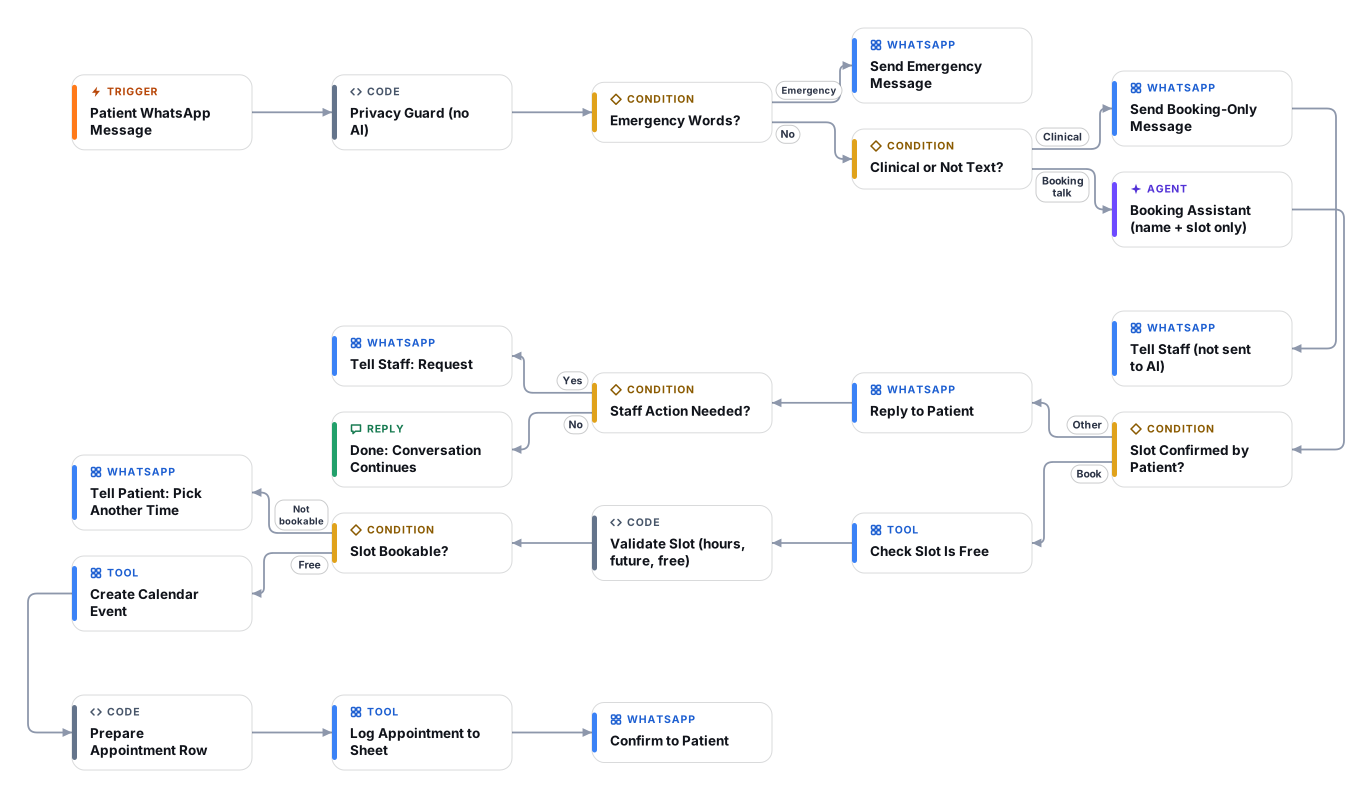
The WhatsApp Business trigger starts a run for every incoming message, remembered per patient phone number.
Code checks the message before any AI sees it. Emergency words get a fixed emergency reply. Clinical-sounding, long or non-text messages skip the AI, get a fixed booking-only reply, and are passed to staff.
The AI asks for the first name and appointment type, checks your calendar and offers up to three free slots. It never asks why the patient is coming.
When the patient confirms a slot, code checks it is in the future, inside opening hours, a sensible length and free in your calendar. Anything unclear fails closed.
A calendar event is created with first name and appointment type only. Name, phone, type and time go to your appointments sheet, never to the model.
Reschedule, cancel and handover requests are passed to your staff WhatsApp number with the administrative details, and the patient is told the team will confirm.
Anyone can read this page. Deploying the template into your workspace needs a Pro, Team or Enterprise plan. Starter workspaces can browse the library but cannot deploy templates. See plans.
You will connect Google Calendar, Google Sheets, OpenRouter API key, WhatsApp Business Cloud API, WhatsApp webhook app and fill in a few settings. Setup takes about 75 minutes. Your credentials stay in your own workspace.
Yes. Using the template creates a normal workflow in your workspace on the visual canvas. Rename it, edit any step, add approvals, test it and run it like any other workflow. It counts toward your plan’s workflow limit.
Yes. This workflow can send or write to external systems. Review the steps and test it with sample data before you activate it, and consider adding an approval step.
More workflows teams use alongside this one.
An always-on WhatsApp assistant for UAE and GCC businesses: answers in English or Arabic, qualifies the lead, books a slot and alerts your team.
OpRead portal lead notification emails, log the lead and open a WhatsApp chat in seconds. Pairs with the WhatsApp responder for qualification and viewings.
OpAnswer guest questions on WhatsApp and take table or slot reservation requests that your staff approve before they are confirmed.
KnOpEvery template is open to read. Deploying one into your workspace needs a Pro, Team or Enterprise plan; Starter workspaces can browse the whole library.