Finance and AccountingNew
Extract invoices from email into Google Sheets with approval
Reads PDF or scanned invoices from a mailbox, checks the numbers, and logs each one to Google Sheets only after a person approves it.
Em Op
OpEmail a packing list or bill of lading, get the shipment fields in a Google Sheet, with a person checking anything uncertain.
Included in Pro and aboveStarter workspaces can read this template but not deploy it.
Freight and logistics teams retype the same fields from every packing list and bill of lading: parties, vessel, ports, containers, packages, weights. This template reads the documents for you and keeps a person in the loop only where the reading is doubtful.
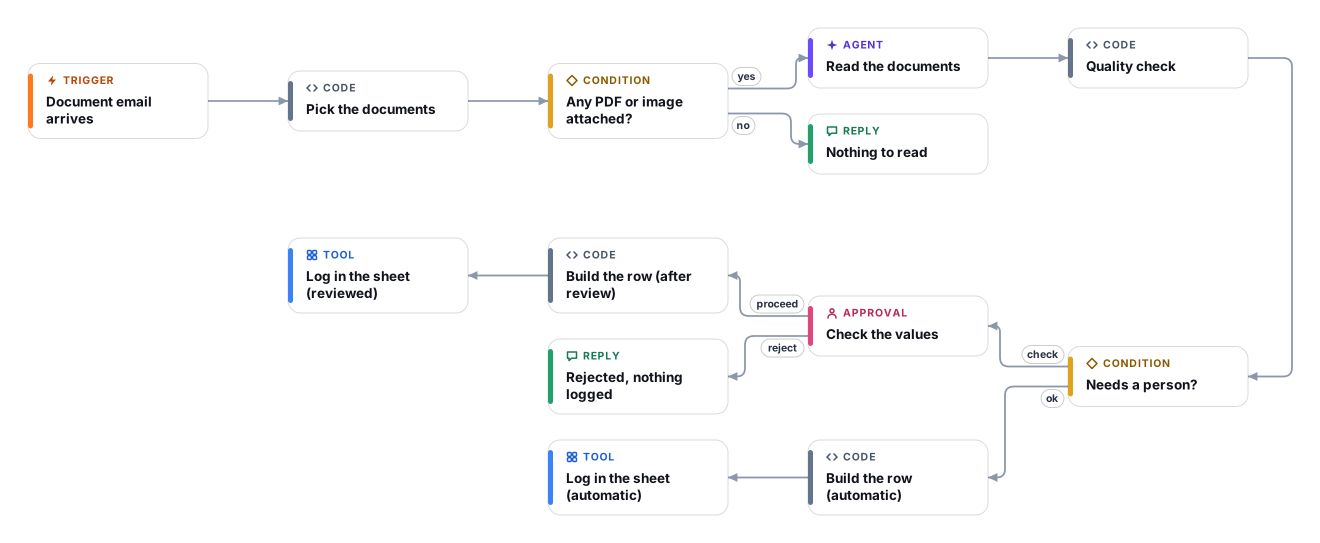
It watches a mailbox you dedicate to shipping documents. When an email arrives with PDF or image attachments, a vision-capable AI model reads the documents directly, including scans and photos, and returns the shipment fields together with an honest confidence score and the names of any fields it was unsure about. A plain code step then runs the checks that should never depend on the AI: confidence limit, required fields present, and container numbers in the standard format of four letters and seven digits.
Clean documents are logged straight into your Google Sheet, one row per email. Anything doubtful stops at a review step that shows the values and the reasons; the reviewer approves, types corrections, or rejects. Every row records whether it was automatic or checked by a person, so you can see how much the AI is trusted over time.
The workflow watches a mailbox over IMAP and downloads PDF and image attachments (up to five per email). Other attachments are ignored.
A vision-capable model reads the attachments directly and returns the document type, parties, vessel, ports, containers, seals, packages, weights, a confidence score and a list of uncertain fields.
Fixed rules decide whether a person must look: confidence below your limit, flagged fields, missing document number, shipper or consignee, or container numbers that do not match the standard format.
The reviewer sees the values and the reasons. They can proceed as is, type corrections as field: value lines, or reject. Rejected documents log nothing.
One row per email is appended to your Google Sheet with the sender, subject, message id, all fields, the confidence and whether a person checked it.
Anyone can read this page. Deploying the template into your workspace needs a Pro, Team or Enterprise plan. Starter workspaces can browse the library but cannot deploy templates. See plans.
You will connect OpenRouter API key, Shipping documents mailbox (IMAP login), Shipping documents mailbox (Microsoft 365), Google Sheets and fill in a few settings. Setup takes about 30 minutes. Your credentials stay in your own workspace.
Yes. Using the template creates a normal workflow in your workspace on the visual canvas. Rename it, edit any step, add approvals, test it and run it like any other workflow. It counts toward your plan’s workflow limit.
No. This template includes a human approval step, so the workflow pauses and waits for a person before the action goes ahead. Every decision is kept in the run history.
More workflows teams use alongside this one.
Reads PDF or scanned invoices from a mailbox, checks the numbers, and logs each one to Google Sheets only after a person approves it.
OpReads a contract PDF from a legal inbox, flags clauses that break your playbook with verified quotes, and replies only after a lawyer approves.
 PDOp
Read each applicant CV, rate it only against your job criteria with evidence, and let a recruiter decide. Fairness guardrails built in.
OpEvery template is open to read. Deploying one into your workspace needs a Pro, Team or Enterprise plan; Starter workspaces can browse the whole library.