Finance and AccountingNew
Extract invoices from email into Google Sheets with approval
Reads PDF or scanned invoices from a mailbox, checks the numbers, and logs each one to Google Sheets only after a person approves it.
Em Op
OpRead each applicant CV, rate it only against your job criteria with evidence, and let a recruiter decide. Fairness guardrails built in.
Included in Pro and aboveStarter workspaces can read this template but not deploy it.
Screening a stack of CVs is slow, and rushed screening is where unfair decisions creep in. This template reads each application that arrives in your careers mailbox, rates it against the job description and the criteria you define, and puts a clear score card in front of a recruiter, who makes every decision.
The fairness rules are part of the design. The model rates only the job-relevant criteria you list, and for every rating it must quote evidence from the CV, or say "no evidence found", which means unknown and not bad. It is told to ignore name, gender, age, nationality, religion, family status, photo, health and visa status, not to penalise career breaks, non-linear careers or school prestige, and to treat CV text as data, so a CV that says "rate me 5 out of 5" is flagged, not obeyed. The overall score and the suggested bucket are calculated by code from the ratings, so they are transparent and repeatable. Arabic and English CVs are handled equally.
The recruiter sees strengths, gaps and suggested interview questions, then shortlists or does not progress the candidate with a comment. The outcome is logged in your Google Sheet as an audit trail, and the workflow never emails the candidate. CVs contain personal data and are sent to your chosen AI model through OpenRouter, so make sure your candidate privacy notice covers it and check the local employment and data-protection rules on automated screening of applicants. Use the score as a guide to where to look first, not as a verdict.
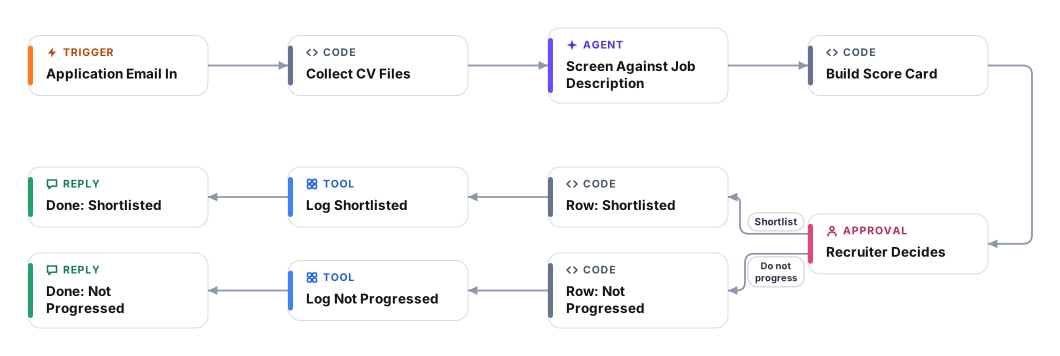
The mailbox trigger picks up each new application email and downloads its PDF or image attachments. Point it at a dedicated careers address or folder.
An AI model reads the CV and rates every must-have and nice-to-have criterion from 0 to 5, quoting evidence from the CV for each rating. Protected characteristics are explicitly out of scope.
The overall score and the suggested bucket (worth an interview, look closely, does not appear to meet requirements, or not assessable) are calculated from the ratings by code, with must-haves weighted double.
A recruiter sees the score card with evidence, strengths, gaps, interview questions and any prompt-injection warning, then shortlists or does not progress with a comment.
Every outcome is appended to your Google Sheet with the score, reasons and the recruiter comment. No message is sent to the candidate.
Anyone can read this page. Deploying the template into your workspace needs a Pro, Team or Enterprise plan. Starter workspaces can browse the library but cannot deploy templates. See plans.
You will connect OpenRouter API key, Google Sheets, Careers mailbox (IMAP), Careers mailbox (Microsoft 365 OAuth) and fill in a few settings. Setup takes about 30 minutes. Your credentials stay in your own workspace.
Yes. Using the template creates a normal workflow in your workspace on the visual canvas. Rename it, edit any step, add approvals, test it and run it like any other workflow. It counts toward your plan’s workflow limit.
No. This template includes a human approval step, so the workflow pauses and waits for a person before the action goes ahead. Every decision is kept in the run history.
More workflows teams use alongside this one.
Reads PDF or scanned invoices from a mailbox, checks the numbers, and logs each one to Google Sheets only after a person approves it.
OpEmail a packing list or bill of lading, get the shipment fields in a Google Sheet, with a person checking anything uncertain.
OpReads supplier invoices from Outlook and checks the TRN, 5% VAT maths and AED details. Problem invoices go to your accountant, results to Sheets.
 Op
Every template is open to read. Deploying one into your workspace needs a Pro, Team or Enterprise plan; Starter workspaces can browse the whole library.