Finance and AccountingNew
Extract invoices from email into Google Sheets with approval
Reads PDF or scanned invoices from a mailbox, checks the numbers, and logs each one to Google Sheets only after a person approves it.
Em Op
OpChecks your receivables sheet every day, drafts courteous WhatsApp or email reminders, and sends them only after approval. Dry run is on by default.
Included in Pro and aboveStarter workspaces can read this template but not deploy it.
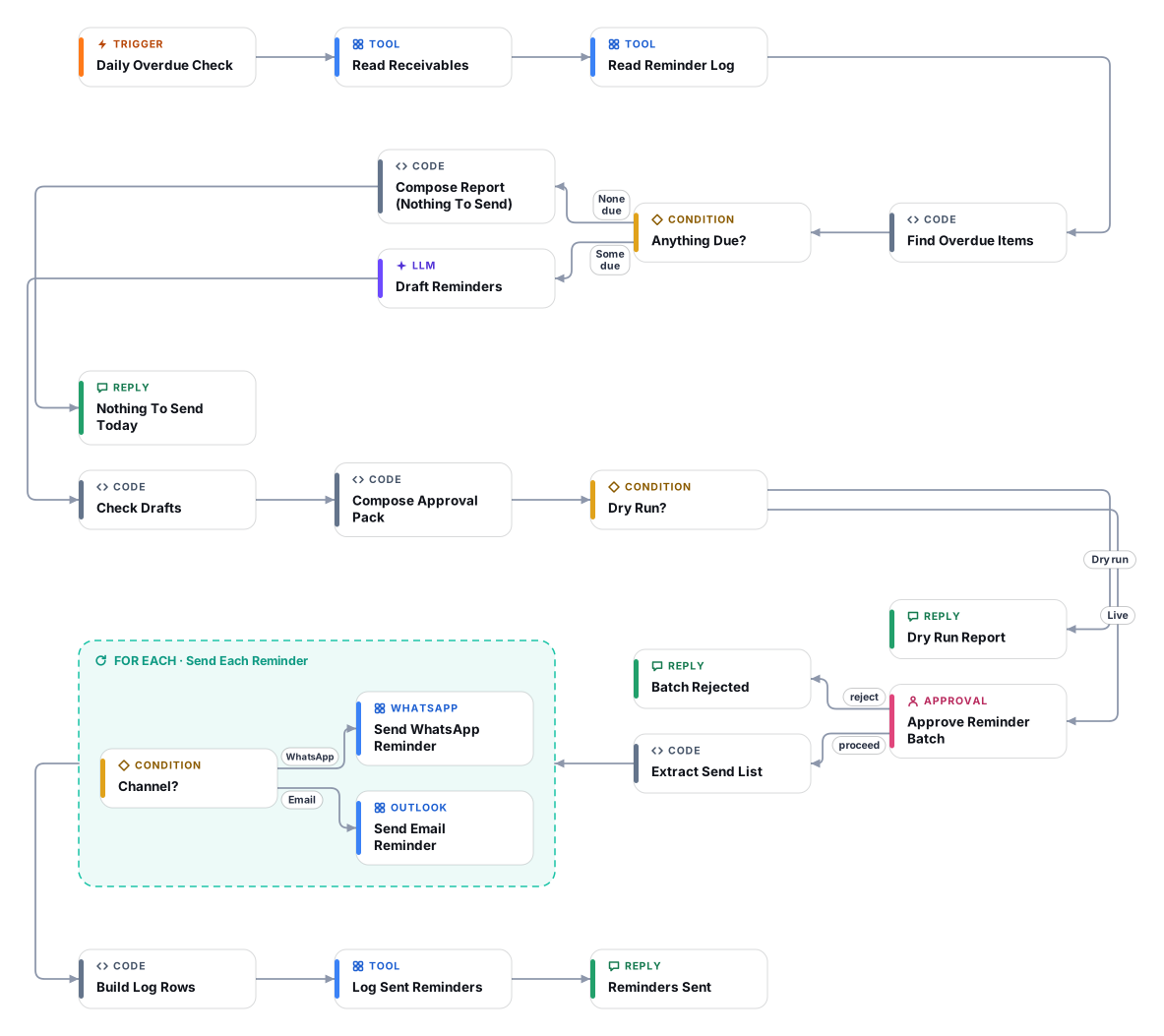
Chasing late payments is awkward and easy to get wrong. This workflow reads a receivables Google Sheet every morning and picks the invoices that are overdue, not paid, not on hold, outside the cooldown since the last reminder and under the maximum number of reminders. It suits schools collecting tuition and other fees as well as small businesses chasing invoices. A language column lets parents or customers receive English, Arabic or both.
An AI model drafts a short, friendly reminder for each item using only the facts in the sheet. Code then checks every draft: the amount, invoice id and currency must appear, no number may appear that is not in the data, and threatening, legal or fee wording is blocked unless you have configured a late-fee policy. Drafts that fail are held back. Accounts that are very late or have already had the maximum number of reminders are not messaged at all; they are listed so a person can call.
The flow starts in dry-run mode. In a dry run it does everything except send and log, and returns the full list of messages it would have sent, so you can judge the tone and the selection for a few days. When you switch dry run off, a person must approve the whole batch in the Cadrix approval inbox before a single message goes out. Approved reminders are sent by WhatsApp or Outlook email and written to a reminder-log tab, which is what enforces the cooldown. The flow never edits your receivables tab. Check local rules on debt reminders and WhatsApp business messaging before going live; first-contact WhatsApp messages usually need an approved template.
A schedule trigger starts the flow daily at 09:00. Set your time zone on the trigger.
Code reads the Receivables tab and the Reminder Log tab and selects unpaid invoices that are overdue past the grace period, outside the cooldown, below the reminder limit and not on hold.
An AI model writes one polite message per invoice in English, Arabic or both, using only the sheet data and your late-fee policy if you provide one.
Code verifies amount, invoice id, currency and tone, blocks invented numbers and threats, and holds back anything doubtful. Very late accounts are listed for a personal call instead.
In dry-run mode the pack is returned and nothing is sent. In live mode a person approves or rejects the whole batch first.
Approved messages go out by WhatsApp or Outlook email, one by one, and each is appended to the Reminder Log tab so it is not repeated until the cooldown has passed.
Anyone can read this page. Deploying the template into your workspace needs a Pro, Team or Enterprise plan. Starter workspaces can browse the library but cannot deploy templates. See plans.
You will connect OpenRouter API key, Google Sheets OAuth, WhatsApp API (for sending), Microsoft Outlook 365 OAuth (for email) and fill in a few settings. Setup takes about 30 minutes. Your credentials stay in your own workspace.
Yes. Using the template creates a normal workflow in your workspace on the visual canvas. Rename it, edit any step, add approvals, test it and run it like any other workflow. It counts toward your plan’s workflow limit.
No. This template includes a human approval step, so the workflow pauses and waits for a person before the action goes ahead. Every decision is kept in the run history.
More workflows teams use alongside this one.
Reads PDF or scanned invoices from a mailbox, checks the numbers, and logs each one to Google Sheets only after a person approves it.
OpEmployees send a receipt photo on WhatsApp. AI reads and categorises it, they confirm, and big or doubtful ones go to a manager before Sheets.
 HTOp
Answer guest questions on WhatsApp and take table or slot reservation requests that your staff approve before they are confirmed.
KnOpEvery template is open to read. Deploying one into your workspace needs a Pro, Team or Enterprise plan; Starter workspaces can browse the whole library.