Cadrix for Support

Answer from what you know, and escalate what you should not guess.

The same questions come in every day, the answers sit in documents nobody searches, and the hard cases get passed around. Build workflows that retrieve from your own content, draft the reply and hand the difficult ones to a person.

Support leadsCustomer service teamsHelpdesk agentsCommunity and success teams

No credit cardBring your own model key

Example workflows

Three ways to start

Each one runs from a trigger, through agent and tool steps, to an approval and an output.

These are illustrative examples assembled from node types in Cadrix. They are not ready-made templates, and your own systems, rules and approvers will shape the real thing.
Example workflow

Grounded first reply

An agent drafts a reply from your help content, and a support agent reviews it before it is sent. The run trace shows what was retrieved.

  1. Trigger
    Outlook 365 Trigger
    A customer email arrives
  2. Knowledge
    Retriever
    Searches your help content
  3. Agent
    Agent
    Drafts a reply from the passages found
  4. Approval
    Human Input
    Support agent edits, approves or rejects
  5. Tool
    Outlook 365
    Sends the approved reply
Example workflow

Escalate to engineering

Tickets from your helpdesk are classified, summarised for engineers and only raised as an issue after a lead confirms.

  1. Trigger
    Webhook Trigger
    The helpdesk posts a new ticket
  2. Decision
    Condition Agent
    Decides: bug, billing or how-to
  3. Agent
    Agent
    Writes a short summary with the steps to reproduce
  4. Approval
    Human Input
    Support lead confirms severity
  5. Tool
    Jira
    Creates the issue for engineering
Example workflow

WhatsApp question, with a safety net

Customers ask on WhatsApp and get an answer from your content. If the agent cannot answer, a teammate takes over.

  1. Trigger
    WhatsApp Trigger
    A customer sends a message
  2. Agent
    Agent
    Answers using the knowledge you attach
  3. Decision
    Condition
    Checks whether a person is needed
  4. Approval
    Human Input
    Teammate reviews the open cases
  5. Output
    WhatsApp Send Message
    Sends the reply
What governance gives you here

Control that fits support work.

  • Review before it is sentCustomer-facing text can wait for a person. The decision is recorded in the run.
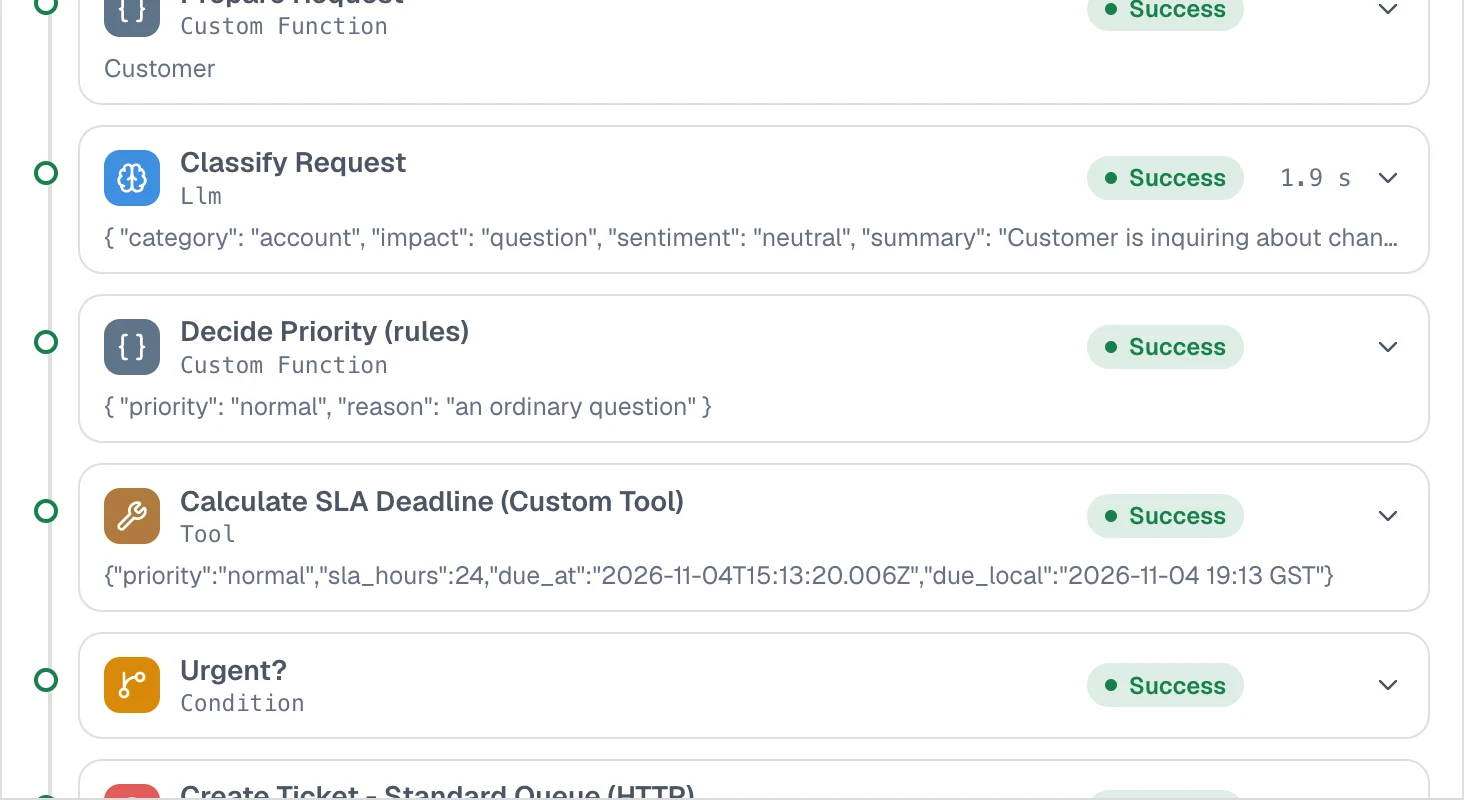
  • See what the agent was givenThe run trace shows each step input and output, including the passages retrieved.
  • Scoped API keysLet your helpdesk call a deployed workflow with a key that carries only the permissions it needs.
  • Connections, not pasted secretsMailbox and messaging credentials are stored as encrypted connections, never shown to builders or the model.
app.cadrixflow.com / runs
Close-up of a Cadrix execution trace listing each step with its status, timing and output

Every step of a run is listed with its status, timing and output.

FAQ

Questions, answered plainly

Cadrix lets you attach a knowledge base so the agent retrieves from your own content, and the run trace shows what it was given. That reduces guessing, but it does not remove the need for review, which is why a Human Input step can sit before any reply is sent.

That is your choice. You can add an approval step only for some cases, for example when a condition says the answer was not found, and let the rest go through.

The examples use Outlook, Gmail, Microsoft Teams, WhatsApp and Jira. You can also start a workflow from a webhook, so a helpdesk or chat tool can post into it. See the integrations page for the current list.

From the sources you load into a knowledge base, such as files and web pages. Check the loader list in the app for the current set.

Build your first Support workflow today.

Start on the free plan, bring your own model key, and see a real run traced end to end.