Cadrix for Sales

Let agents do the research and drafting. Reps keep the relationship.

Leads sit in inboxes, research takes a tab for every company, proposals are assembled by hand and follow-ups slip. Build workflows that prepare the work, then stop for the rep or manager before anything reaches a customer.

Sales leadersAccount executivesSales operationsRevenue operations

No credit cardBring your own model key

Example workflows

Three ways to start

Each one runs from a trigger, through agent and tool steps, to an approval and an output.

These are illustrative examples assembled from node types in Cadrix. They are not ready-made templates, and your own systems, rules and approvers will shape the real thing.
Example workflow

Inbound lead research

A web form submission is researched, summarised against your criteria and passed to a rep, who decides whether it goes into your CRM.

  1. Trigger
    Webhook Trigger
    A web form posts a new lead
  2. Agent
    Agent
    Researches the company with a search tool
  3. Decision
    Condition
    Checks the lead against your criteria
  4. Approval
    Human Input
    Rep reviews the summary
  5. Tool
    HTTP
    Creates the record in your CRM API
Example workflow

Proposal pack

A rep asks for a proposal. The agent retrieves your product and case content, drafts the slides and a manager approves the deck.

  1. Trigger
    Webhook Trigger
    A rep requests a proposal
  2. Knowledge
    Retriever
    Pulls relevant product content
  3. Agent
    Agent
    Drafts the slide content
  4. Approval
    Human Input
    Sales manager approves
  5. Output
    Generate PowerPoint
    Builds the .pptx deck
Example workflow

Follow-up drafts

Each morning the workflow reads your deal sheet and drafts a follow-up per stale deal. Drafts are created for the rep to send, not sent for them.

  1. Trigger
    Schedule Trigger
    Every weekday morning
  2. Tool
    Google Sheets
    Gets deals with no recent activity
  3. Agent
    Agent
    Drafts a follow-up for each deal
  4. Approval
    Human Input
    Rep reviews the drafts
  5. Tool
    Gmail
    Creates the drafts in the rep mailbox
What governance gives you here

Control that fits sales work.

  • The rep decides what is sentCustomer-facing messages and CRM writes sit behind a Human Input step. Drafts are created, not sent, unless you build it otherwise.
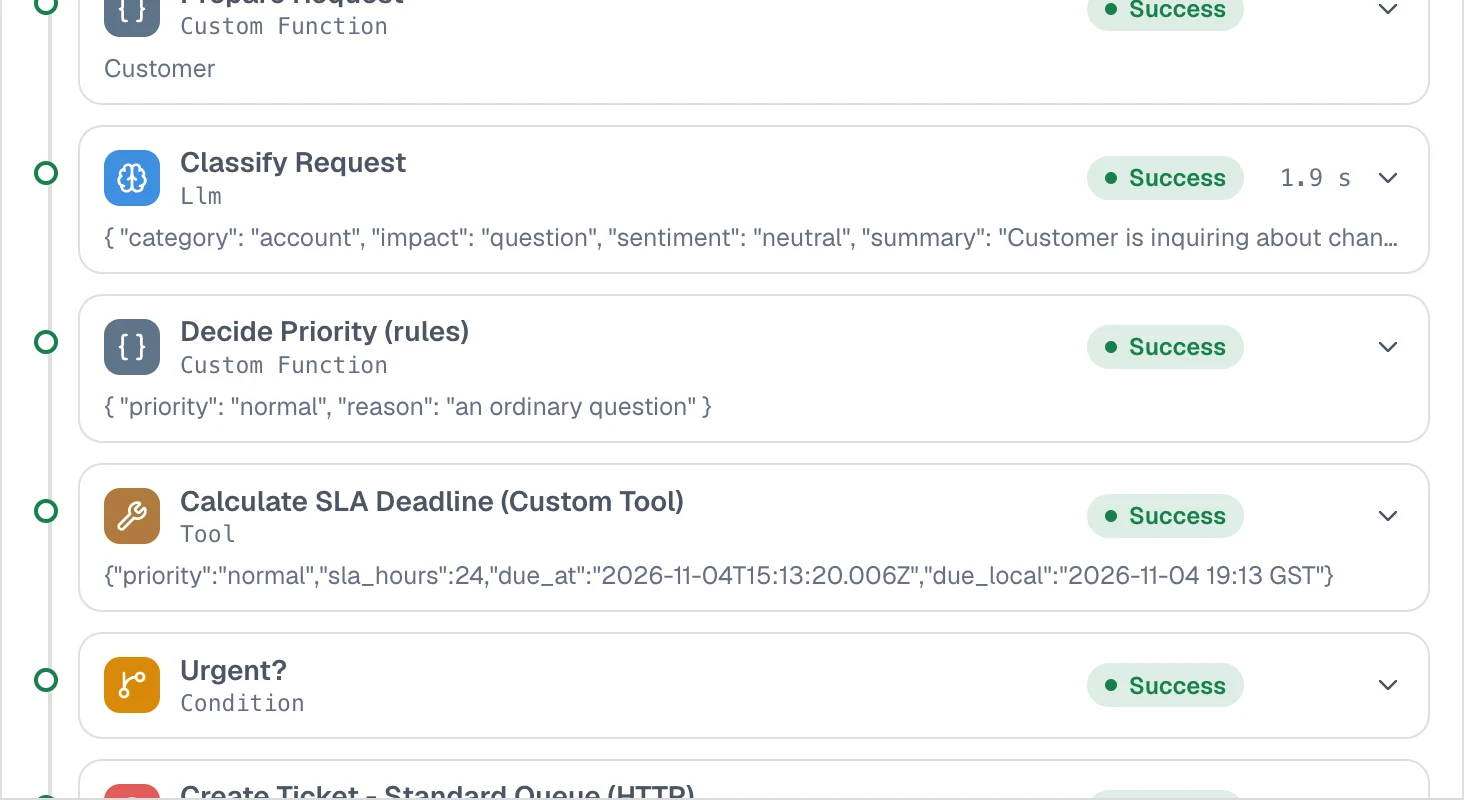
  • Every run on the recordSee what the agent researched and drafted, step by step, with timings and outputs.
  • Scoped API keysLet your website or CRM start a workflow with a key that carries only the permissions it needs.
  • Usage and quotasWatch runs, tokens and estimated spend, and cap monthly tokens before research workflows run up a bill.
app.cadrixflow.com / runs
Close-up of a Cadrix execution trace listing each step with its status, timing and output

Each run shows what every step received and returned.

FAQ

Questions, answered plainly

Not through a dedicated CRM node in these examples. The workflow calls your CRM API with the HTTP node, and you can also connect tools through Composio or an MCP server. Check the integrations page for what is in the catalog today.

They can if you build it that way. The examples create drafts and wait for a rep, because an outbound message is usually worth a human look.

From the search tools you give the agent, such as Tavily or Brave Search, using your own keys. The run trace shows what it found.

You can track runs, tokens and estimated spend on the usage page and set a monthly token cap. Model usage is billed by your provider, because you bring your own key.

Build your first Sales workflow today.

Start on the free plan, bring your own model key, and see a real run traced end to end.