Cadrix for People teams

Answer routine questions fast. Leave the people decisions to people.

Policy questions repeat, onboarding is a checklist spread across inboxes and applications pile up. Build workflows that retrieve from your own HR documents and prepare the paperwork, with a person deciding anything that affects someone.

HR managersPeople operationsRecruitersInternal communications

No credit cardBring your own model key

Example workflows

Three ways to start

Each one runs from a trigger, through agent and tool steps, to an approval and an output.

These are illustrative examples assembled from node types in Cadrix. They are not ready-made templates, and your own systems, rules and approvers will shape the real thing.
Example workflow

Policy questions

Staff ask a question from an intranet page or chat tool. The agent answers from your policy text, and anything it cannot find goes to HR.

  1. Trigger
    Webhook Trigger
    The intranet posts a question
  2. Knowledge
    Retriever
    Searches the HR policy documents
  3. Agent
    Agent
    Answers and cites the source passage
  4. Decision
    Condition
    Checks whether the policy covered it
  5. Approval
    Human Input
    HR answers the open cases
Example workflow

New starter pack

When a new hire is recorded, the agent prepares a tailored checklist and welcome document. The manager approves it before it is sent.

  1. Trigger
    Webhook Trigger
    Your HR system posts a new starter
  2. Agent
    Agent
    Builds a personalised checklist
  3. Approval
    Human Input
    Manager approves the pack
  4. Output
    HTML to PDF
    Produces the welcome document
  5. Tool
    Outlook 365
    Sends it to the new starter
Example workflow

Application summary for the panel

The agent summarises an application against the role description. A recruiter makes every decision, and nothing is rejected automatically.

  1. Trigger
    Email Trigger
    An application arrives
  2. Agent
    Agent
    Summarises it against the role
  3. Approval
    Human Input
    Recruiter decides what happens next
  4. Tool
    Google Calendar
    Creates the interview event
  5. Tool
    Google Sheets
    Logs the outcome in the tracker
What governance gives you here

Control that fits sensitive people work.

  • People decisions stay with peopleUse a Human Input step wherever a decision affects someone. The decision and who took it are part of the run trace.
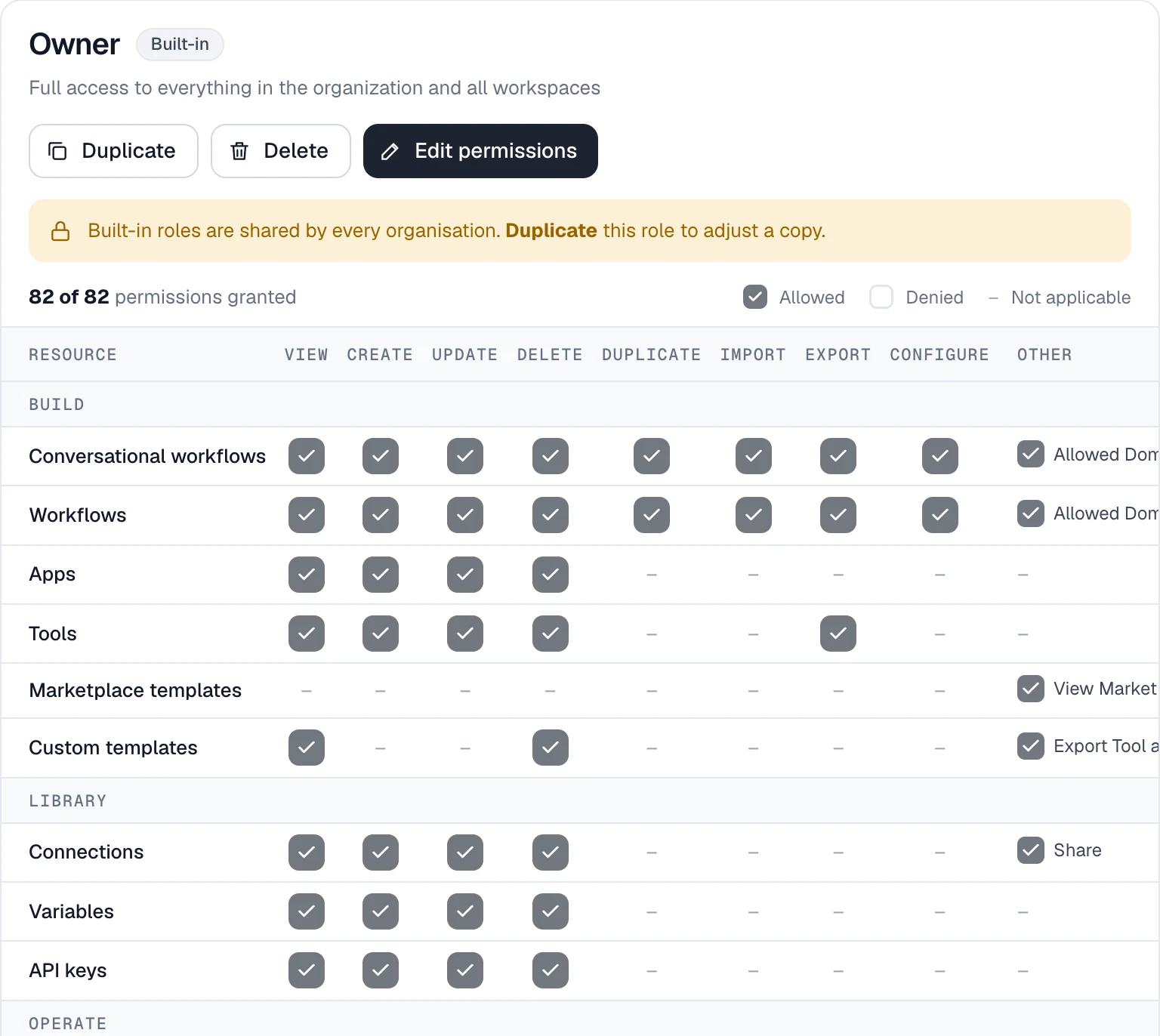
  • Roles per resourceOnly the people you choose can view, build or run these workflows. Permissions are enforced on the server.
  • Workspaces for separationKeep HR workflows and their data in their own workspace with their own members.
  • Connections, not shared loginsMailbox and calendar access is stored as an encrypted connection, never shown to builders or the model.
app.cadrixflow.com / roles
The Cadrix roles permission matrix showing view, create, update and delete actions per resource

Permissions are set per resource and per action.

FAQ

Questions, answered plainly

No, and the example is built so it does not. The agent only summarises, and a recruiter makes every decision at the Human Input step. How you use AI in hiring is for you to decide, including any legal requirements in your region.

Yes. Put the workflows and connections in their own workspace and give it its own members.

It retrieves from the knowledge base you attach and answers from that content. The run trace shows what it retrieved. Keep the documents up to date, because the answers follow them.

The workflows are drawn on a visual canvas. Connecting a mailbox or an HR system takes a technical colleague once, then it can be reused.

Build your first People workflow today.

Start on the free plan, bring your own model key, and see a real run traced end to end.