Cadrix for Finance

Automate the reading and the drafting. Keep the decision with finance.

Invoices arrive as attachments, payment questions land in inboxes and month-end commentary is rebuilt by hand. Build workflows that do the reading and drafting, then stop for an approver, with every step on the record.

Finance managersAccounts payable teamsControllersFP&A analysts

No credit cardBring your own model key

Example workflows

Three ways to start

Each one runs from a trigger, through agent and tool steps, to an approval and an output.

These are illustrative examples assembled from node types in Cadrix. They are not ready-made templates, and your own systems, rules and approvers will shape the real thing.
Example workflow

Invoice capture

The agent reads an incoming invoice, checks it against your supplier list and adds a line to your ledger sheet only once an approver confirms.

  1. Trigger
    Outlook 365 Trigger
    An invoice email arrives
  2. Tool
    Google Sheets
    Gets the approved supplier list
  3. Agent
    Agent
    Extracts supplier, amount and due date
  4. Approval
    Human Input
    Approver confirms the details
  5. Tool
    Google Sheets
    Appends the line to the ledger
Example workflow

Payment and invoice enquiries

A customer asks about an invoice. The agent looks up the record, drafts a reply and a person approves it before it leaves.

  1. Trigger
    Email Trigger
    A customer email arrives
  2. Tool
    Stripe
    Reads the customer and invoice record
  3. Agent
    Agent
    Drafts a clear reply
  4. Approval
    Human Input
    Finance team member approves
  5. Tool
    Gmail
    Sends the message
Example workflow

Month-end commentary

A scheduled run pulls figures from a sheet, drafts the variance commentary and produces a workbook after the finance lead has reviewed it.

  1. Trigger
    Schedule Trigger
    On the first working day
  2. Tool
    Google Sheets
    Gets the month-end figures
  3. Agent
    Agent
    Drafts commentary on the movements
  4. Approval
    Human Input
    Finance lead reviews and edits
  5. Output
    Generate Excel
    Creates the .xlsx workbook
What governance gives you here

Control that fits finance work.

  • Approval before money movesPlace a Human Input step before anything is posted, sent or paid. Nothing past that step runs until someone decides.
  • A record you can showEvery run lists its steps with inputs, outputs and timings. Edited re-runs and retries are new linked runs, so history is never overwritten.
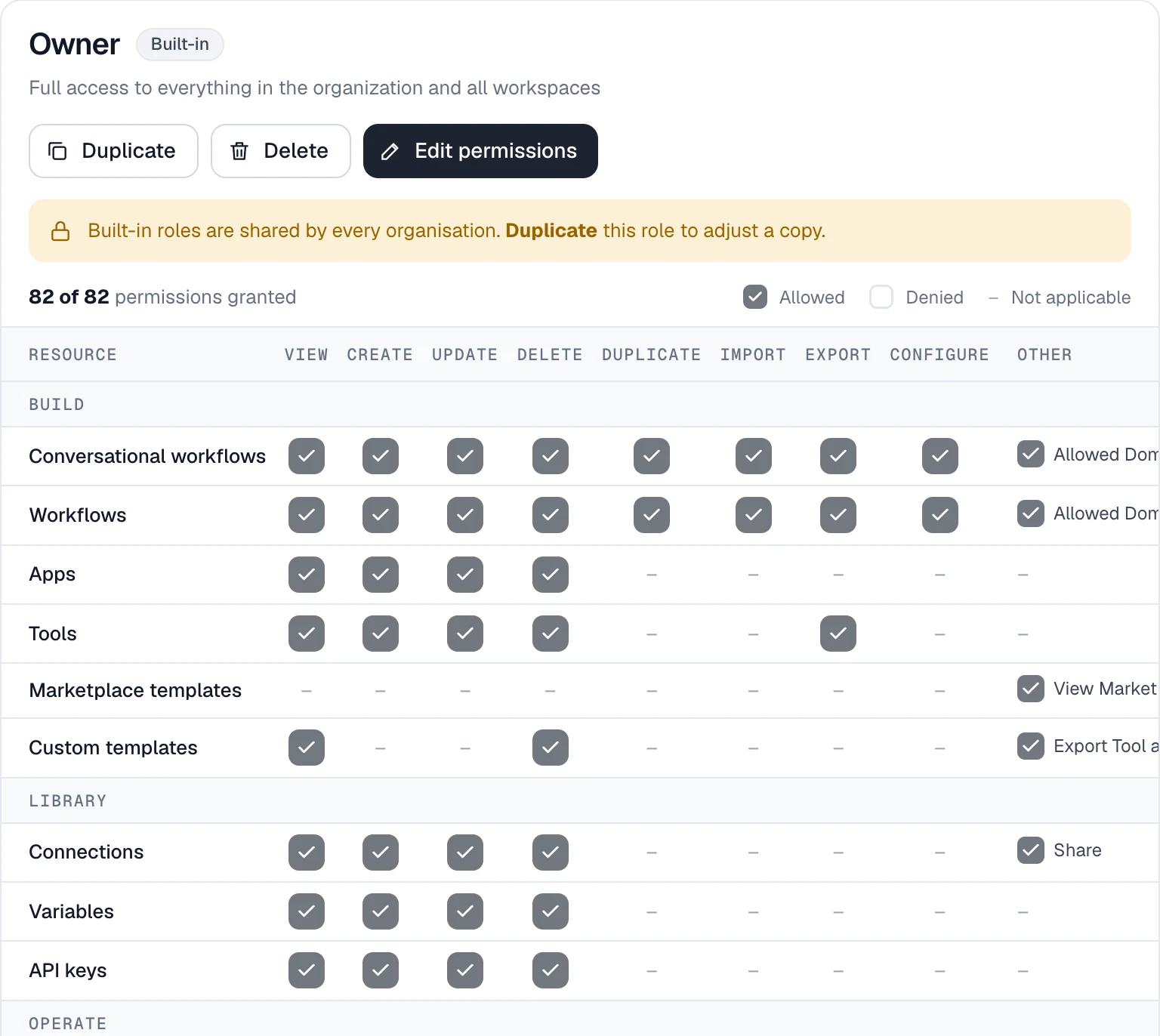
  • Roles per resourceControl who can view, build and run workflows. Custom roles with a permission matrix are available on Team and Enterprise.
  • Usage and quotasTrack runs, tokens and estimated spend, and set a monthly token cap.
app.cadrixflow.com / roles
The Cadrix roles permission matrix showing view, create, update and delete actions per resource

Permissions are set per resource and per action.

FAQ

Questions, answered plainly

You decide. The examples stop at a Human Input step so that a person approves before anything is posted or sent. Cadrix does not decide for you where that step belongs.

Open the run. Each step lists its input, output, status and timing, and an approval is part of that record.

No. They are illustrative workflows you assemble from the Outlook, Google Sheets, Stripe and Gmail nodes. Your sheets, rules and approvers will differ.

Credentials are stored as connections in your workspace, encrypted at rest, and are never shown to builders or the model. You bring your own model key.

Build your first Finance workflow today.

Start on the free plan, bring your own model key, and see a real run traced end to end.